Parameter zu Annotationen hinzufügen mittels Rewrite-Aktionen

In diesem Blogbeitrag werden wir:
- Das Suchen und Abgleichen von Annotationen demonstrieren
- Annotationen mithilfe von Mustache-Templates anpassen
Sensei bietet die Möglichkeit, problematische Codemuster zu finden und sie durch vereinbarte Implementierungen zu ersetzen. In diesem Beispiel verwende ich @Disabled ohne Parameter als problematisches Codemuster.
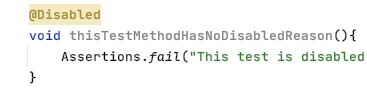
Deaktivierte Test-Annotation
Deaktivierte Tests ohne Angabe eines Grundes können langfristig problematisch sein, da wir vergessen, warum sie deaktiviert wurden.
@Disabled
void thisTestMethodHasNoDisabledReason(){
Assertions.fail("This test is disabled and should not run");
}
Das Risiko besteht darin, dass sich die Codebasis im Laufe der Zeit weiterentwickelt, der deaktivierte Test nicht an den Zweck des Codes angepasst wird, schließlich redundant und irrelevant wird und möglicherweise nie wieder aktiviert wird.
Bei Code-Reviews weisen wir oft darauf hin, dass es sinnvoll ist, eine erklärende Beschreibung als Annotationsparameter hinzuzufügen.
@Disabled ("Disabled to demonstrate adding a reason")
void thisTestMethodHasDisabledReason(){
Assertions.fail("This test is disabled and should not run");
}
Ein Sensei-Rezept
Wir können ein Rezept schreiben, um zu erkennen, wenn @Disabled ohne Erklärung hinzugefügt wird, sowie einen Quick Fix, der uns daran erinnert, den tatsächlichen Grund für die Deaktivierung anzugeben.
Wenn ich überlege, was zu tun ist, muss ich:
- die Disabled-Annotation ohne Parameter finden
- die Disabled-Annotation so ändern, dass sie einen Parameter mit dem Platzhaltertext „TODO: add a description here“ enthält
Ein Warnungs-Rezept erstellen
Ich verwende Alt+Enter, um ein neues Rezept zu erstellen.

Anschließend füge ich den grundlegenden Beschreibungstext in den allgemeinen Informationen hinzu.

Indem die Regel als Warnung definiert wird, wird der entsprechende Code hervorgehoben, aber nicht als schwerwiegender Fehler angezeigt.
Annotation finden
Im Rezept-Editor ändere ich die Suche so, dass sie mit einer Annotation übereinstimmt.
Dadurch werden alle Annotationen in der Vorschau hervorgehoben.

Danach möchte ich nach dem Annotationstyp filtern.
Ich könnte einfach „Disabled“ verwenden, aber ich gebe die Klasse vollständig mit dem Paket an, damit nur die Annotation von JUnit 5 gefunden wird. Da der Quellcode in der Vorschau angezeigt wird, kann ich ihn einfach aus dem tatsächlichen Code kopieren und einfügen, um Tippfehler zu vermeiden.
Ich möchte dann nur Annotationen ohne Parameter finden, was ich über die Benutzeroberfläche erledigen kann.

d. h. Suche:
search:
annotation:
type: "org.junit.jupiter.api.Disabled"
without:
parameters:
- {}
Eine Rewrite-Quick-Fix-Aktion erstellen
Für meinen QuickFix verwende ich eine Rewrite-Aktion.
Ich nutze die Variablen anzeigen-Funktion, um mir die Mustache-Variablen anzeigen zu lassen und den Inhalt in der Vorschau zu sehen.

Anschließend füge ich den zusätzlichen Code hinzu, der für den Platzhalter-Kommentar erforderlich ist.

d. h. QuickFix:
availableFixes:
- name: "Add a todo comment parameter"
actions:
- rewrite:
to: "{{{ . }}}(\"TODO: add a description here\")"
target: "self"
Sensei in Aktion
Wir haben ein kurzes Video erstellt, das den Prozess der Rezept-Erstellung in Aktion zeigt.
Zusammenfassung
Beim Erstellen eines Rewrite-Quick-Fix ist es einfacher, wenn wir nach dem Code-Element suchen können, das wir umschreiben möchten, da es dann die „self“-Entität ist, auf die wir einwirken können.
In diesem Beispiel habe ich eine Rewrite-Aktion verwendet, um die Annotation zu ändern. Rewrite ist eine universelle Aktion, die auf jedes Code-Element angewendet werden kann und ein guter Ausgangspunkt für eigene Experimente ist.
Kontrollieren Sie KI-gestützte Entwicklung, bevor sie in Produktion geht
Bewerten Sie KI-gestützte Risiken, setzen Sie Richtlinien für sicheren Code direkt beim Commit durch und beschleunigen Sie die sichere Bereitstellung über Ihren gesamten SDLC hinweg.
Weitere Blogs entdecken
Erhalten Sie Zugang zu Experteninhalten über sichere Programmierung, KI-Governance und Software-Risikomanagement.
%252520%252520(3).avif)
Supercharged Security Awareness: How Tournaments are Inspiring Developers at Erste Group
Lorem ipsum dolor sit amet, consectetur adipiscing elit. Suspendisse varius enim in eros elementum tristique. Duis cursus, mi quis viverra ornare, eros dolor interdum nulla, ut commodo diam libero vitae erat. Aenean faucibus nibh et justo cursus id rutrum lorem imperdiet. Nunc ut sem vitae risus tristique posuere.

Security as culture: How Blue Prism cultivates world-class secure developers
Learn how Blue Prism, the global leader in intelligent automation for the enterprise, used Secure Code Warrior's agile learning platform to create a security-first culture with their developers, achieve their business goals, and ship secure code at speed

Eine Sicherheitskultur: Wie Sage sein Champions-Programm aufgebaut hat
Erfahren Sie, wie Sage die Sicherheit durch einen flexiblen, beziehungsorientierten Ansatz gestärkt, über 200 Security Champions ausgebildet und eine messbare Risikoreduzierung erzielt hat.
Cybersecurity Awareness Month 2026: Das Verständnis von KI-Sicherheit ist entscheidend für die Unternehmensverteidigung
Wir haben einen Punkt erreicht, an dem die meisten führenden KI-Unternehmen öffentlich eine weltweite Verlangsamung der KI-Entwicklung gefordert haben, damit die Sicherheitsvorkehrungen Schritt halten können. Doch die Wahrheit ist: Ernsthafte Sicherheitsprobleme sind bereits Realität geworden. Dies bringt unzählige Sicherheitsverantwortliche und Führungsteams in eine dringliche Lage, da die finanziellen Kosten und Risiken durch die Implementierung von KI stetig steigen.
Enabler 8: Branding für Ihr Programm
Ein Programm für sicheres Programmieren braucht mehr als nur großartige Inhalte, um erfolgreich zu sein. Enabler 8 zeigt, wie Branding die Teilnahme zu einem begehrten, statusorientierten Erlebnis macht.
.avif)
Jeder Mitarbeiter steht jetzt an vorderster Front der KI-Cybersicherheit
Die Unternehmenslandschaft wandelt sich mit einer Geschwindigkeit, die kaum jemand vorhergesehen hat, bis es zu spät war. Wir haben offiziell die Schwelle von handgeschriebenem Code und einfacher Copilot-Unterstützung hin zur Ära des Agentic Development Lifecycle (ADLC) überschritten. Während autonome KI-Agenten eine beispiellose Effizienz in vielen Bereichen versprechen, bringen sie auch eine völlig neue Klasse von Sicherheits- und Regulierungsrisiken mit sich.
Sichere KI-gestützte Entwicklung vor dem Release
Erkennen Sie Entwicklerrisiken, setzen Sie Richtlinien durch und verhindern Sie Schwachstellen über den gesamten Softwareentwicklungszyklus hinweg.
