使用重写操作为注解添加参数

在这篇博文中,我们将:
- 演示如何搜索和匹配注解
- 使用 mustache 模板修改注解
Sensei 能够匹配有问题的代码模式,并将其修改为约定的实现方式。在本例中,我将不带参数的 @Disabled 作为有问题的代码模式。
禁用测试注解
从长远来看,没有说明原因的禁用测试可能会带来问题,因为我们往往会忘记当初禁用它的原因。
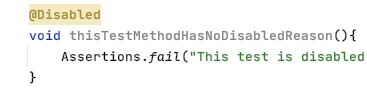
@Disabled
void thisTestMethodHasNoDisabledReason(){
Assertions.fail("This test is disabled and should not run");
}
风险在于,随着时间的推移,代码库不断演进,被禁用的测试没有随代码目的的变更而更新,最终变得多余且无关紧要,甚至可能永远无法重新启用。
在代码审查过程中,我们经常会指出,最好将解释性描述作为注解参数添加进去。
@Disabled ("Disabled to demonstrate adding a reason")
void thisTestMethodHasDisabledReason(){
Assertions.fail("This test is disabled and should not run");
}
Sensei 配方
我们可以编写一个配方来检测未加说明的 @Disabled,并提供一个快速修复功能,提醒我们添加禁用该测试的实际原因。
在构思操作步骤时,我需要:
- 匹配没有任何参数的 Disabled 注解
- 修改 Disabled 注解,使其包含一个带有“TODO: add a description here”标记文本的参数
创建警告配方
我使用 Alt+Enter 来创建一个新配方。

然后在常规信息中添加基本的描述性文本。

通过将规则设为警告,任何匹配的代码都会被高亮显示,但不会被标记为严重的错误。
查找注解
在配方编辑器中,我将搜索目标更改为匹配注解。
这将在预览中高亮显示所有注解。

完成此操作后,我想按注解类型进行过滤。
我可以直接使用 Disabled,但我通过包名完整限定了类名,这样它就只会匹配 JUnit 5 中的注解。由于预览中会显示源代码,我可以轻松地从实际代码中复制并粘贴,以避免任何拼写错误。
然后,我只想匹配没有参数的注解,我可以使用图形界面来实现这一点。

即搜索:
search:
annotation:
type: "org.junit.jupiter.api.Disabled"
without:
parameters:
- {}
创建重写快速修复操作
对于我的快速修复,我将使用重写操作。
我使用 显示变量 功能来查看 Mustache 变量并预览其内容。

然后,我添加创建占位符注释所需的额外代码。

即快速修复:
availableFixes:
- name: "Add a todo comment parameter"
actions:
- rewrite:
to: "{{{ . }}}(\"TODO: add a description here\")"
target: "self"
Sensei 实战演示
我们制作了一个简短的视频,展示了配方创建过程的实际操作。
总结
在构建重写快速修复时,如果我们能搜索到想要重写的代码元素,操作会更容易,因为这样它就成了我们可以直接处理的自身实体。
在此示例中,我使用重写操作来修改注解。重写是一种通用操作,适用于任何代码元素,是一个值得探索的良好默认选项。
在 AI 驱动的开发成果发布前实现有效治理
评估 AI 辅助风险,在提交代码时强制执行安全编码策略,并加速整个软件开发生命周期的安全交付。
探索更多博客
获取有关安全编码、人工智能治理和软件风险管理的专家内容。
%252520%252520(3).avif)
Supercharged Security Awareness: How Tournaments are Inspiring Developers at Erste Group
Lorem ipsum dolor sit amet, consectetur adipiscing elit. Suspendisse varius enim in eros elementum tristique. Duis cursus, mi quis viverra ornare, eros dolor interdum nulla, ut commodo diam libero vitae erat. Aenean faucibus nibh et justo cursus id rutrum lorem imperdiet. Nunc ut sem vitae risus tristique posuere.

Security as culture: How Blue Prism cultivates world-class secure developers
Learn how Blue Prism, the global leader in intelligent automation for the enterprise, used Secure Code Warrior's agile learning platform to create a security-first culture with their developers, achieve their business goals, and ship secure code at speed

.avif)
在产品发布前确保 AI 驱动的开发安全
洞察开发风险,执行安全策略,并在整个软件开发生命周期中预防漏洞。
