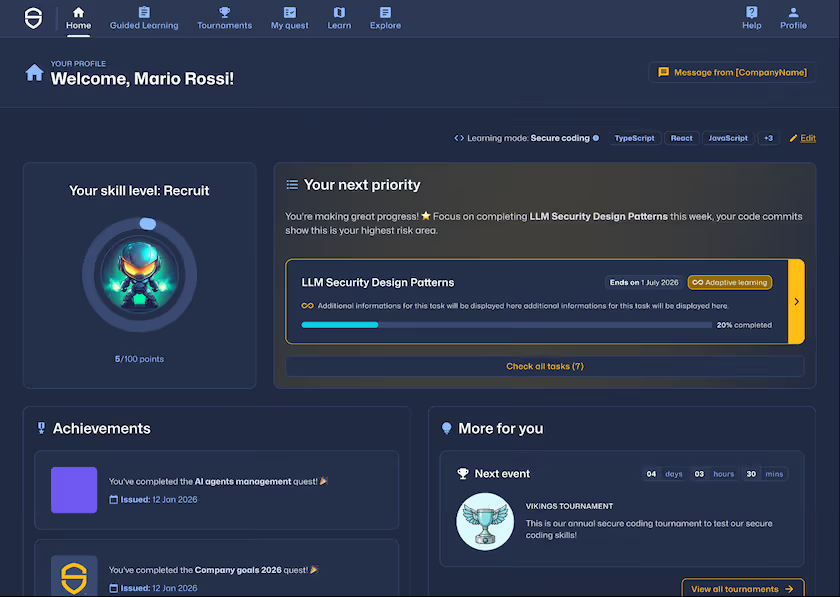
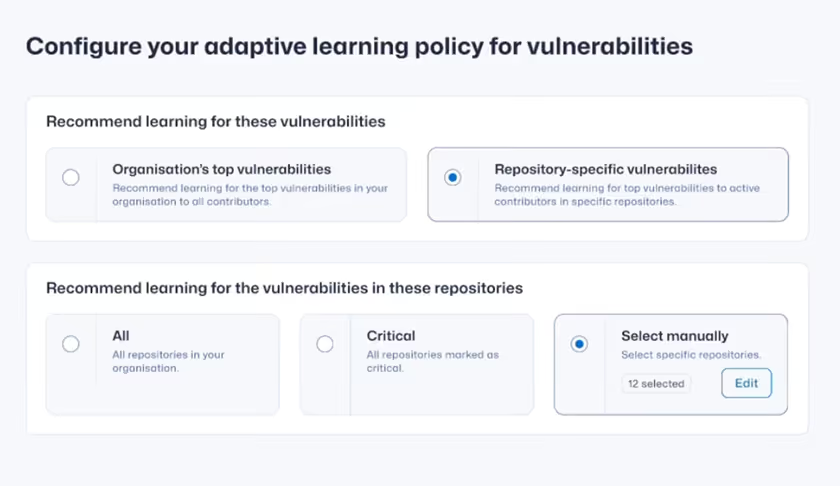
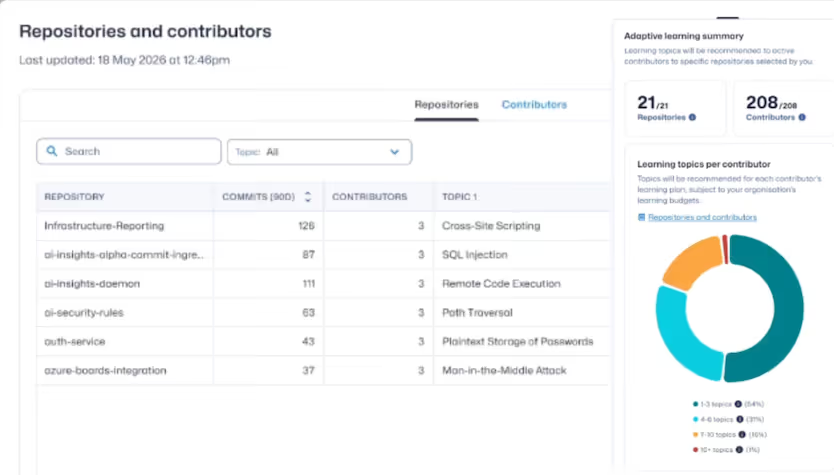
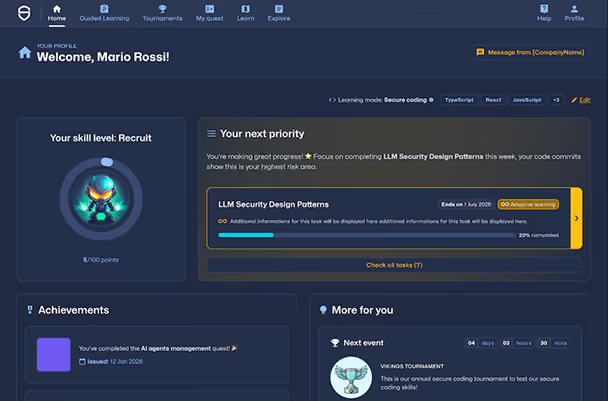
So today, I'll take you through the end to end journey as to how someone might connect their commit data with repositories, their vulnerability data, set up a policy, and then a request get assigned to learners, and then admin can get access to completion reports. So first, you will see I have a demo instance, I don't have Trust Agent: Commits connected. So I'm gonna gonna go ahead and do that. I'll go to commits and connections. You'll see I don't have connections connected. So in this case, I'm going to use the manual upload data for the benefit of this demo. And what I'm doing is just selecting a YAML file that I have. And what I'm going to do is name this repository in a specific way, and I'm going to upload this one repository. And what I'll do is I'll upload one extra repository from another YAML file. Once that is done, you'll see that now I have two repositories. I have now these are ingested. I can see I have five commits with five contributors. Now what I'll do is I need to upload my vulnerability data to make use of the dev learning. And in this case, I'll use a serif file as an upload. This is coming very soon, and I'm going to pick two serif files that I have for both of these repositories. And while once I upload this, you'll see that the cert file is coming through in the import log. I can see that that has been successful. When I go to the repository settings page, if I refresh it, now you'll see that my page has been updated. Now I can see a list of an overview of which mid repositories have been identified and then also how many of the vulnerability repositories have also been mapped to commit repositories. You can see that we have matched these repos. There are vulnerabilities in those repositories, and now not only commits, but also I can see that there are CWEs in those repos. Awesome. So now what I'm going to do is go to the policy page to actually set up the policy. Once I start configuring the adaptive learning policy, I have two options. One, organization's top vulnerabilities and repository specific vulnerabilities. So if I pick org top vulnerabilities, what this is going to do is look at aggregate all of the vulnerability data across all repos, whether it has repos or not, and then calculate the top three vulnerabilities across the entire data set of phones. And then it will assign learning to all SCW platform users regardless whether they're committing code or not. So this is kind of your catchall way of doing training. And then, obviously, the other one is the repository specific training. I can then select which repos I would like to configure the training for, so which repos are in scope for receiving training and then contributors to which repos will also get training. I can select all repos, critical repos only, or specific repositories. In this case, I'll pick all, and then I can see how many repositories I have and how many contributors are in those repositories. And I can then see that ten users are going to get anywhere from one to three topics based on how many repos they contribute to and how many vulnerabilities are in those repos. And I can also see that all of the contributors that I have, they only contribute contribute to one repos. So that kinda makes it pretty simple. And once I click save policy, then the policy becomes active. Importantly, training will only be assigned to code contributors into repositories found with vulnerability data. Keep in mind that, for example, in this particular instance, there are nearly two thousand starting users. But if I go to trust agent commits and see how many contributors are there, there's only ten code contributors. So as far as adaptive learning policy, you can see there's only ten code contributors that are contributing code to repositories with vulnerability data. And according to adaptive policy adaptive learning policy, only these ten users are going to get trained. So that's important to understand the difference between org level and group level content assignment. Now if we take this particular user as an example and look into how that learning shows up on their screen, we can now see that now with our new beautiful dashboard, there's a new task for developer to complete, and you'll see that there is a new topic. And if I click check all tasks, I'll see that there's SQL injection, insufficient logging and monitoring, and using nonvolatile components. There's a three topics that were assigned, and I can see that they're tagged as adaptive learning. And if I click on those, as far as the user is concerned, I'll be able to complete them. Once users complete training, if we switch back to the admins view, we can then find the adaptive learning report under trust agent tab. And here, you'll see a this is a Tableau report, but what it would will do is aggregate all of their data from from the background and present a single view for the admin to track how many of the learners have not started and progressed or have completed their adaptive learning. You can see it's very similar to the current request report where I can look through completion through topics, and I can also look through completion by learners. The only difference to this report compared to Quest is rather than individual Quest, we can then see a repository for which they were assigned to Quest. So then if the same user contributing to multiple repositories, they'll get assigned multiple Quest. And that's pretty much it, really.

.svg)