SCW Icons
hero bg no divider
Blog

安全编码技术:让我们来谈谈 Tapjacking

Pieter De Cremer
Published Oct 31, 2017
Last updated on Mar 09, 2026

Tapjacking, a combination of "tap" and "hijacking", means just that. It is an attack where the attacker hijacks the users taps and tricks him into doing something he did not intend. So how does it work and how do we prevent it?

Well start our story with screen overlays. Screen overlays or as Google calls them, windows using the type TYPE_APPLICATION_OVERLAY. These are windows that are drawn on top of other apps and usually only obscure a part of the screen. These are often used (like the example image below) when an app requests new permissions.
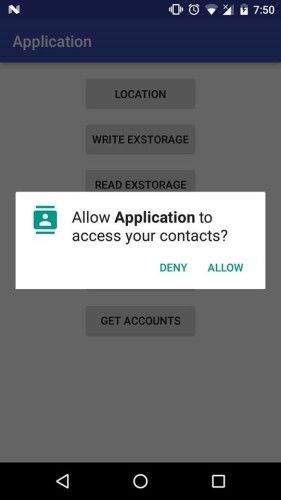
Allow Application To Access Your Contact Popup

This is actually a cool and fun feature and more and more apps are starting to use it, think about Facebooks chat bubbles, or Google Maps navigation in a corner of your screen, like the screenshot below.
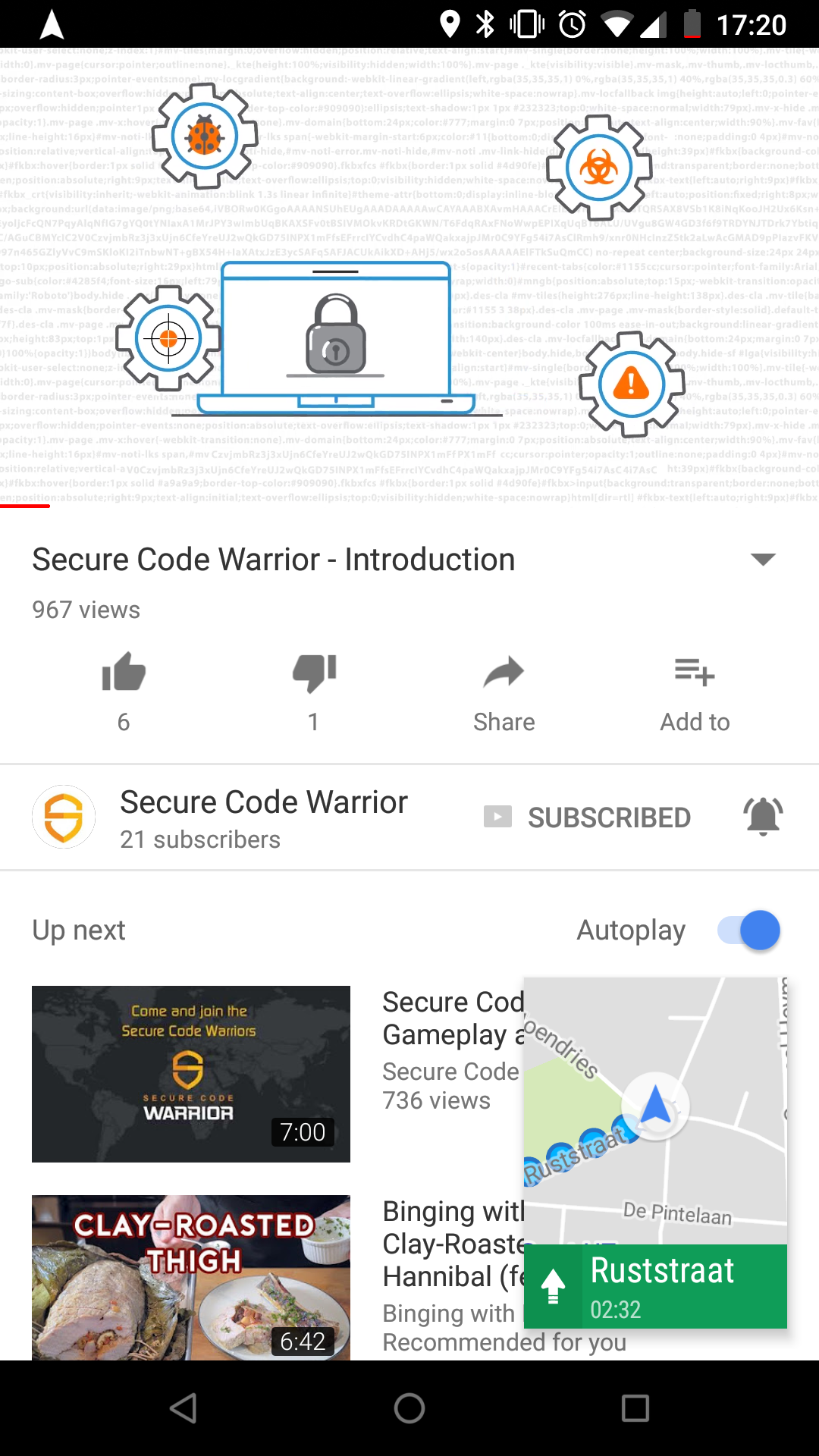
Secure Code Warrior Introduction Video

However, there are some security risks involved with these overlays. Any active screen overlay can listen for taps, how else would Facebook know that we tapped or dragged the bubble? This allows apps to spy on you and potentially steal passwords and credit card data.

One step further, and this is where the term tapjacking comes from, overlays can draw things on top of other apps tricking the user to perform different actions. The user thinks he is interacting with the overlay but in reality, his taps also perform actions in the underlying app. This way, the overlay can trick you into enabling certain permissions, or change some dangerous settings, as demonstrated in this old YouTube video.

The demonstration video above was uploaded to YouTube in 2010, so it was done on an older version of Android. But the attack is still relevant today, as vulnerabilities came to light that allows tapjacking in newer versions of Android such as Nougat and Marshmallow.

So what can you do about it? As a user, it is important to realize the consequences of these overlays and be aware of apps that use it. As of API level 23 (Android 6.0 Marshmallow), this has become a permission that has to be explicitly granted by the user. However, that leaves 50% of Androidusers still vulnerable. You can still check what apps make use of this permission in the settings under "Display over other apps".

As developers, it is up to us to make sure user actions are done with the full knowledge and consent of the user. Android provides a setting for your views that do just that, called filterTouchesWhenObscured. When it is enabled, the framework will discard touches that are received whenever the views window is obscured by another visible window. Its as simple as that, set filterTouchesWhenObscured to true, and your app is safe from tapjacking.

Good luck and see you next week!

Sometimes it is essential that an application be able to verify that an action is being performed with the full knowledge and consent of the user, such as granting a permission request, making a purchase or clicking on an advertisement. Unfortunately, a malicious application could try to spoof the user into performing these actions, unaware, by concealing the intended purpose of the view.

https://developer.android.com/reference/android/view/View.html

手里拿着手机的用户
手里拿着手机的用户
查看资源
查看资源

有时,应用程序必须能够在用户完全知情和同意的情况下验证操作是否正在执行

对更多感兴趣?

Application Security Researcher - R&D Engineer - PhD Candidate

learn more

Secure Code Warrior可以帮助您的组织在整个软件开发生命周期中保护代码,并营造一种将网络安全放在首位的文化。无论您是 AppSec 经理、开发人员、首席信息安全官还是任何与安全相关的人,我们都可以帮助您的组织降低与不安全代码相关的风险。

预订演示
分享到:
linkedin brandsSocialx logo
作者
Pieter De Cremer
Published Oct 31, 2017

Application Security Researcher - R&D Engineer - PhD Candidate

分享到:
linkedin brandsSocialx logo
手里拿着手机的用户
手里拿着手机的用户

Tapjacking, a combination of "tap" and "hijacking", means just that. It is an attack where the attacker hijacks the users taps and tricks him into doing something he did not intend. So how does it work and how do we prevent it?

Well start our story with screen overlays. Screen overlays or as Google calls them, windows using the type TYPE_APPLICATION_OVERLAY. These are windows that are drawn on top of other apps and usually only obscure a part of the screen. These are often used (like the example image below) when an app requests new permissions.

Allow Application To Access Your Contact Popup

This is actually a cool and fun feature and more and more apps are starting to use it, think about Facebooks chat bubbles, or Google Maps navigation in a corner of your screen, like the screenshot below.

Secure Code Warrior Introduction Video

However, there are some security risks involved with these overlays. Any active screen overlay can listen for taps, how else would Facebook know that we tapped or dragged the bubble? This allows apps to spy on you and potentially steal passwords and credit card data.

One step further, and this is where the term tapjacking comes from, overlays can draw things on top of other apps tricking the user to perform different actions. The user thinks he is interacting with the overlay but in reality, his taps also perform actions in the underlying app. This way, the overlay can trick you into enabling certain permissions, or change some dangerous settings, as demonstrated in this old YouTube video.

The demonstration video above was uploaded to YouTube in 2010, so it was done on an older version of Android. But the attack is still relevant today, as vulnerabilities came to light that allows tapjacking in newer versions of Android such as Nougat and Marshmallow.

So what can you do about it? As a user, it is important to realize the consequences of these overlays and be aware of apps that use it. As of API level 23 (Android 6.0 Marshmallow), this has become a permission that has to be explicitly granted by the user. However, that leaves 50% of Androidusers still vulnerable. You can still check what apps make use of this permission in the settings under "Display over other apps".

As developers, it is up to us to make sure user actions are done with the full knowledge and consent of the user. Android provides a setting for your views that do just that, called filterTouchesWhenObscured. When it is enabled, the framework will discard touches that are received whenever the views window is obscured by another visible window. Its as simple as that, set filterTouchesWhenObscured to true, and your app is safe from tapjacking.

Good luck and see you next week!

Sometimes it is essential that an application be able to verify that an action is being performed with the full knowledge and consent of the user, such as granting a permission request, making a purchase or clicking on an advertisement. Unfortunately, a malicious application could try to spoof the user into performing these actions, unaware, by concealing the intended purpose of the view.

https://developer.android.com/reference/android/view/View.html

查看资源
查看资源

填写下面的表格下载报告

我们希望获得您的许可,以便向您发送有关我们的产品和/或相关安全编码主题的信息。我们将始终非常谨慎地对待您的个人信息,绝不会出于营销目的将其出售给其他公司。

提交
scw success icon
scw error icon
要提交表单,请启用 “分析” Cookie。完成后,可以随意再次禁用它们。
手里拿着手机的用户

Tapjacking, a combination of "tap" and "hijacking", means just that. It is an attack where the attacker hijacks the users taps and tricks him into doing something he did not intend. So how does it work and how do we prevent it?

Well start our story with screen overlays. Screen overlays or as Google calls them, windows using the type TYPE_APPLICATION_OVERLAY. These are windows that are drawn on top of other apps and usually only obscure a part of the screen. These are often used (like the example image below) when an app requests new permissions.

Allow Application To Access Your Contact Popup

This is actually a cool and fun feature and more and more apps are starting to use it, think about Facebooks chat bubbles, or Google Maps navigation in a corner of your screen, like the screenshot below.

Secure Code Warrior Introduction Video

However, there are some security risks involved with these overlays. Any active screen overlay can listen for taps, how else would Facebook know that we tapped or dragged the bubble? This allows apps to spy on you and potentially steal passwords and credit card data.

One step further, and this is where the term tapjacking comes from, overlays can draw things on top of other apps tricking the user to perform different actions. The user thinks he is interacting with the overlay but in reality, his taps also perform actions in the underlying app. This way, the overlay can trick you into enabling certain permissions, or change some dangerous settings, as demonstrated in this old YouTube video.

The demonstration video above was uploaded to YouTube in 2010, so it was done on an older version of Android. But the attack is still relevant today, as vulnerabilities came to light that allows tapjacking in newer versions of Android such as Nougat and Marshmallow.

So what can you do about it? As a user, it is important to realize the consequences of these overlays and be aware of apps that use it. As of API level 23 (Android 6.0 Marshmallow), this has become a permission that has to be explicitly granted by the user. However, that leaves 50% of Androidusers still vulnerable. You can still check what apps make use of this permission in the settings under "Display over other apps".

As developers, it is up to us to make sure user actions are done with the full knowledge and consent of the user. Android provides a setting for your views that do just that, called filterTouchesWhenObscured. When it is enabled, the framework will discard touches that are received whenever the views window is obscured by another visible window. Its as simple as that, set filterTouchesWhenObscured to true, and your app is safe from tapjacking.

Good luck and see you next week!

Sometimes it is essential that an application be able to verify that an action is being performed with the full knowledge and consent of the user, such as granting a permission request, making a purchase or clicking on an advertisement. Unfortunately, a malicious application could try to spoof the user into performing these actions, unaware, by concealing the intended purpose of the view.

https://developer.android.com/reference/android/view/View.html

观看网络研讨会
开始吧
learn more

点击下面的链接并下载此资源的PDF。

Secure Code Warrior可以帮助您的组织在整个软件开发生命周期中保护代码,并营造一种将网络安全放在首位的文化。无论您是 AppSec 经理、开发人员、首席信息安全官还是任何与安全相关的人,我们都可以帮助您的组织降低与不安全代码相关的风险。

查看报告预订演示
查看资源
分享到:
linkedin brandsSocialx logo
对更多感兴趣?

分享到:
linkedin brandsSocialx logo
作者
Pieter De Cremer
Published Oct 31, 2017

Application Security Researcher - R&D Engineer - PhD Candidate

分享到:
linkedin brandsSocialx logo

Tapjacking, a combination of "tap" and "hijacking", means just that. It is an attack where the attacker hijacks the users taps and tricks him into doing something he did not intend. So how does it work and how do we prevent it?

Well start our story with screen overlays. Screen overlays or as Google calls them, windows using the type TYPE_APPLICATION_OVERLAY. These are windows that are drawn on top of other apps and usually only obscure a part of the screen. These are often used (like the example image below) when an app requests new permissions.

Allow Application To Access Your Contact Popup

This is actually a cool and fun feature and more and more apps are starting to use it, think about Facebooks chat bubbles, or Google Maps navigation in a corner of your screen, like the screenshot below.

Secure Code Warrior Introduction Video

However, there are some security risks involved with these overlays. Any active screen overlay can listen for taps, how else would Facebook know that we tapped or dragged the bubble? This allows apps to spy on you and potentially steal passwords and credit card data.

One step further, and this is where the term tapjacking comes from, overlays can draw things on top of other apps tricking the user to perform different actions. The user thinks he is interacting with the overlay but in reality, his taps also perform actions in the underlying app. This way, the overlay can trick you into enabling certain permissions, or change some dangerous settings, as demonstrated in this old YouTube video.

The demonstration video above was uploaded to YouTube in 2010, so it was done on an older version of Android. But the attack is still relevant today, as vulnerabilities came to light that allows tapjacking in newer versions of Android such as Nougat and Marshmallow.

So what can you do about it? As a user, it is important to realize the consequences of these overlays and be aware of apps that use it. As of API level 23 (Android 6.0 Marshmallow), this has become a permission that has to be explicitly granted by the user. However, that leaves 50% of Androidusers still vulnerable. You can still check what apps make use of this permission in the settings under "Display over other apps".

As developers, it is up to us to make sure user actions are done with the full knowledge and consent of the user. Android provides a setting for your views that do just that, called filterTouchesWhenObscured. When it is enabled, the framework will discard touches that are received whenever the views window is obscured by another visible window. Its as simple as that, set filterTouchesWhenObscured to true, and your app is safe from tapjacking.

Good luck and see you next week!

Sometimes it is essential that an application be able to verify that an action is being performed with the full knowledge and consent of the user, such as granting a permission request, making a purchase or clicking on an advertisement. Unfortunately, a malicious application could try to spoof the user into performing these actions, unaware, by concealing the intended purpose of the view.

https://developer.android.com/reference/android/view/View.html

目录

下载PDF
查看资源
对更多感兴趣?

Application Security Researcher - R&D Engineer - PhD Candidate

learn more

Secure Code Warrior可以帮助您的组织在整个软件开发生命周期中保护代码,并营造一种将网络安全放在首位的文化。无论您是 AppSec 经理、开发人员、首席信息安全官还是任何与安全相关的人,我们都可以帮助您的组织降低与不安全代码相关的风险。

预订演示下载
分享到:
linkedin brandsSocialx logo
资源中心

帮助您入门的资源

更多帖子
资源中心

帮助您入门的资源

更多帖子