Sichere Programmierung: Alles über Tapjacking

Tapjacking, eine Kombination aus „Tap“ (Tippen) und „Hijacking“ (Entführung), ist genau das, wonach es klingt. Bei diesem Angriff kapert der Angreifer die Eingaben des Benutzers und verleitet ihn dazu, Aktionen auszuführen, die er gar nicht beabsichtigt hat. Wie funktioniert das und wie können wir uns davor schützen?
Beginnen wir mit Bildschirm-Overlays. Bildschirm-Overlays – oder wie Google sie nennt: Fenster vom Typ TYPE_APPLICATION_OVERLAY – sind Fenster, die über anderen Apps gezeichnet werden und meist nur einen Teil des Bildschirms verdecken. Sie werden häufig verwendet, wenn eine App neue Berechtigungen anfordert (siehe Bild unten). Diese sind Fenster, die über anderen Apps liegen und meist nur einen Teil des Bildschirms verdecken. Sie werden oft verwendet (wie im Beispielbild unten), wenn eine App neue Berechtigungen anfordert.
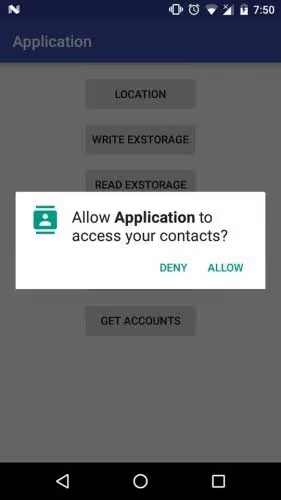
Das ist eigentlich eine praktische Funktion, die immer häufiger genutzt wird – denken Sie nur an die Chat-Blasen von Facebook oder die Google Maps-Navigation in einer Ecke Ihres Bildschirms, wie im Screenshot unten zu sehen.
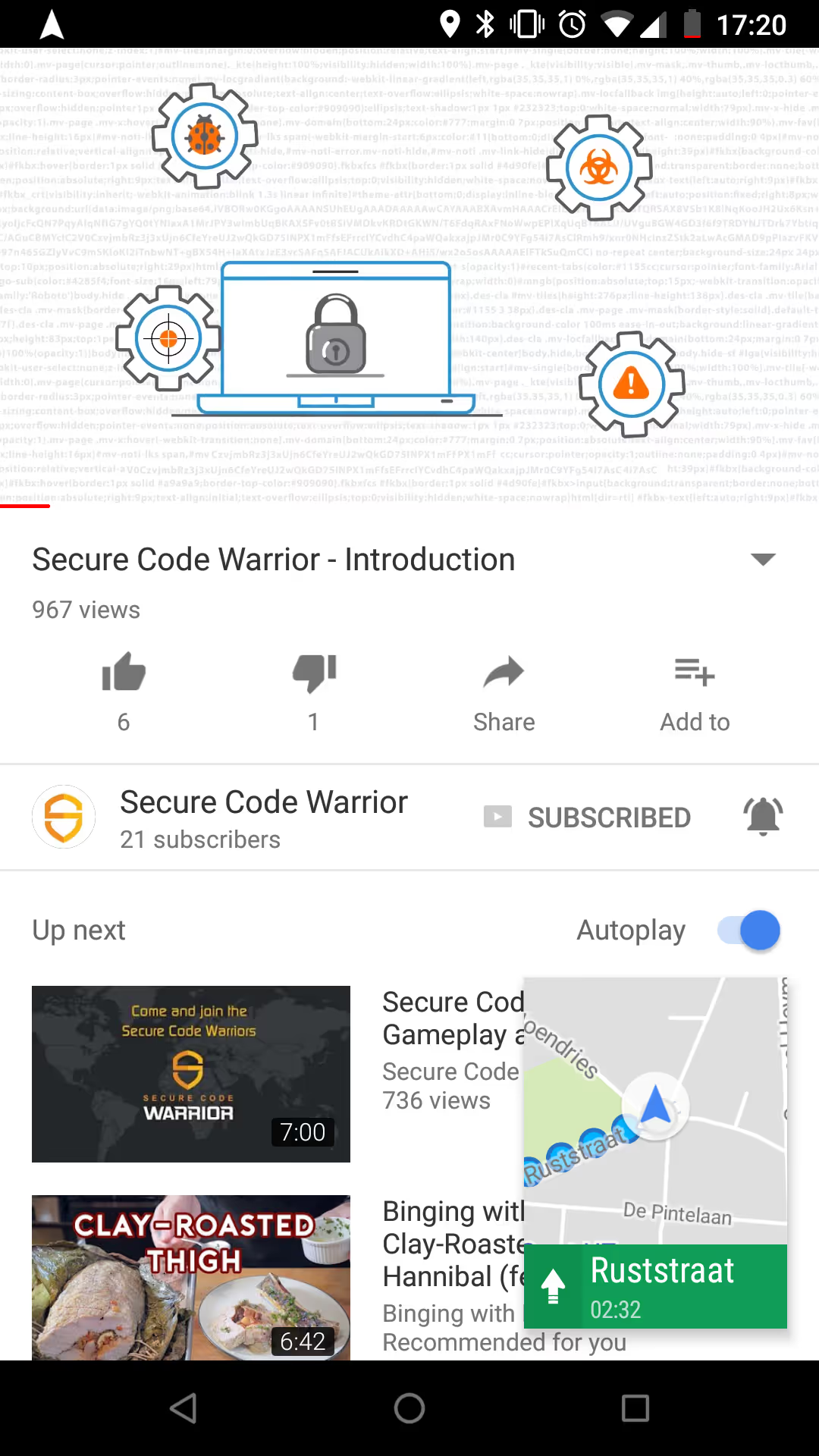
Allerdings sind mit diesen Overlays einige Sicherheitsrisiken verbunden. Jedes aktive Bildschirm-Overlay kann Eingaben registrieren – wie sollte Facebook sonst wissen, dass wir auf die Blase getippt oder sie verschoben haben? Dies ermöglicht es Apps, Sie auszuspionieren und potenziell Passwörter sowie Kreditkartendaten zu stehlen.
Einen Schritt weiter – und hierher stammt der Begriff Tapjacking – können Overlays Dinge über andere Apps zeichnen und den Benutzer so täuschen, dass er andere Aktionen ausführt. Der Benutzer glaubt, mit dem Overlay zu interagieren, doch in Wirklichkeit lösen seine Eingaben Aktionen in der darunterliegenden App aus. Auf diese Weise kann das Overlay Sie dazu bringen, bestimmte Berechtigungen zu erteilen oder gefährliche Einstellungen zu ändern, wie in diesem alten YouTube-Video demonstriert.
Das obige Demonstrationsvideo wurde 2010 auf YouTube hochgeladen und basiert daher auf einer älteren Android-Version. Der Angriff ist jedoch auch heute noch relevant, da Schwachstellen bekannt wurden, die Tapjacking auch in neueren Android-Versionen wie Nougat und Marshmallow ermöglichen.
Was können Sie also dagegen tun? Als Benutzer ist es wichtig, sich der Konsequenzen dieser Overlays bewusst zu sein und auf Apps zu achten, die sie verwenden. Seit API-Level 23 (Android 6.0 Marshmallow) ist dies eine Berechtigung, die explizit vom Benutzer erteilt werden muss. Das lässt jedoch 50 % der Android-Nutzer weiterhin anfällig. Sie können in den Einstellungen unter „Über anderen Apps einblenden“ jederzeit überprüfen, welche Apps diese Berechtigung nutzen.
Als Entwickler liegt es an uns, sicherzustellen, dass Benutzeraktionen mit vollem Wissen und Einverständnis erfolgen. Android bietet für Ihre Views eine Einstellung genau hierfür: filterTouchesWhenObscured. Wenn diese aktiviert ist, verwirft das Framework Eingaben, sobald das Fenster der View von einem anderen sichtbaren Fenster verdeckt wird. So einfach ist das: Setzen Sie filterTouchesWhenObscured auf „true“, und Ihre App ist vor Tapjacking geschützt.
Viel Erfolg und bis nächste Woche!
Manchmal ist es unerlässlich, dass eine Anwendung sicherstellen kann, dass eine Aktion mit dem vollen Wissen und der Zustimmung des Benutzers erfolgt, etwa bei der Erteilung von Berechtigungen, einem Kauf oder dem Klicken auf eine Anzeige. Leider könnte eine bösartige Anwendung versuchen, den Benutzer durch Verschleierung des eigentlichen Zwecks der View zu täuschen.
https://developer.android.com/reference/android/view/View.html
Kontrollieren Sie KI-gestützte Entwicklung, bevor sie in Produktion geht
Bewerten Sie KI-gestützte Risiken, setzen Sie Richtlinien für sicheren Code direkt beim Commit durch und beschleunigen Sie die sichere Bereitstellung über Ihren gesamten SDLC hinweg.
Weitere Blogs entdecken
Erhalten Sie Zugang zu Experteninhalten über sichere Programmierung, KI-Governance und Software-Risikomanagement.
%252520%252520(3).avif)
Supercharged Security Awareness: How Tournaments are Inspiring Developers at Erste Group
Lorem ipsum dolor sit amet, consectetur adipiscing elit. Suspendisse varius enim in eros elementum tristique. Duis cursus, mi quis viverra ornare, eros dolor interdum nulla, ut commodo diam libero vitae erat. Aenean faucibus nibh et justo cursus id rutrum lorem imperdiet. Nunc ut sem vitae risus tristique posuere.
Security as culture: How Blue Prism cultivates world-class secure developers
Learn how Blue Prism, the global leader in intelligent automation for the enterprise, used Secure Code Warrior's agile learning platform to create a security-first culture with their developers, achieve their business goals, and ship secure code at speed

Eine Sicherheitskultur: Wie Sage sein Champions-Programm aufgebaut hat
Erfahren Sie, wie Sage die Sicherheit durch einen flexiblen, beziehungsorientierten Ansatz gestärkt, über 200 Security Champions ausgebildet und eine messbare Risikoreduzierung erzielt hat.
Cybersecurity Awareness Month 2026: Das Verständnis von KI-Sicherheit ist entscheidend für die Unternehmensverteidigung
Wir haben einen Punkt erreicht, an dem die meisten führenden KI-Unternehmen öffentlich eine weltweite Verlangsamung der KI-Entwicklung gefordert haben, damit die Sicherheitsvorkehrungen Schritt halten können. Doch die Wahrheit ist: Ernsthafte Sicherheitsprobleme sind bereits Realität geworden. Dies bringt unzählige Sicherheitsverantwortliche und Führungsteams in eine dringliche Lage, da die finanziellen Kosten und Risiken durch die Implementierung von KI stetig steigen.
Enabler 8: Branding für Ihr Programm
Ein Programm für sicheres Programmieren braucht mehr als nur großartige Inhalte, um erfolgreich zu sein. Enabler 8 zeigt, wie Branding die Teilnahme zu einem begehrten, statusorientierten Erlebnis macht.
.avif)
Jeder Mitarbeiter steht jetzt an vorderster Front der KI-Cybersicherheit
Die Unternehmenslandschaft wandelt sich mit einer Geschwindigkeit, die kaum jemand vorhergesehen hat, bis es zu spät war. Wir haben offiziell die Schwelle von handgeschriebenem Code und einfacher Copilot-Unterstützung hin zur Ära des Agentic Development Lifecycle (ADLC) überschritten. Während autonome KI-Agenten eine beispiellose Effizienz in vielen Bereichen versprechen, bringen sie auch eine völlig neue Klasse von Sicherheits- und Regulierungsrisiken mit sich.
Sichere KI-gestützte Entwicklung vor dem Release
Erkennen Sie Entwicklerrisiken, setzen Sie Richtlinien durch und verhindern Sie Schwachstellen über den gesamten Softwareentwicklungszyklus hinweg.
