Run your secure coding program from your AI tool

AI is changing how code gets written. Security and training leaders need every team on track, with training that targets the most common vulnerabilities in their code, so developers can catch them, whether they write the code or review what AI generates. The questions are clear: Who's completed mandatory training? How is each team progressing? Does our curriculum cover the vulnerabilities showing up in our code? Answering them takes more effort than it should. Showing what your program achieves usually means logging into the platform, pulling several reports, combining them by hand, and rebuilding the result for whoever asked. More of your team's planning, building, and reporting now happens inside AI tools, but your SCW data is still in the platform, one step away from where the work gets done.
Today we're announcing the general availability of the SCW MCP Server, which connects any MCP-compatible AI tool directly to your latest SCW data. You can ask about your program in plain language, then use the answers to draft Quests and build reports for your next review. It's included with your SCW plan at no additional charge.
What the SCW MCP Server is
Model Context Protocol (MCP) is an open standard that lets AI tools connect to other systems. The SCW MCP Server is a hosted MCP endpoint for the SCW platform. Company admins set up once from the AI tool they already use, whether that's a chat assistant, a code editor, a command-line coding tool, or their own agent.
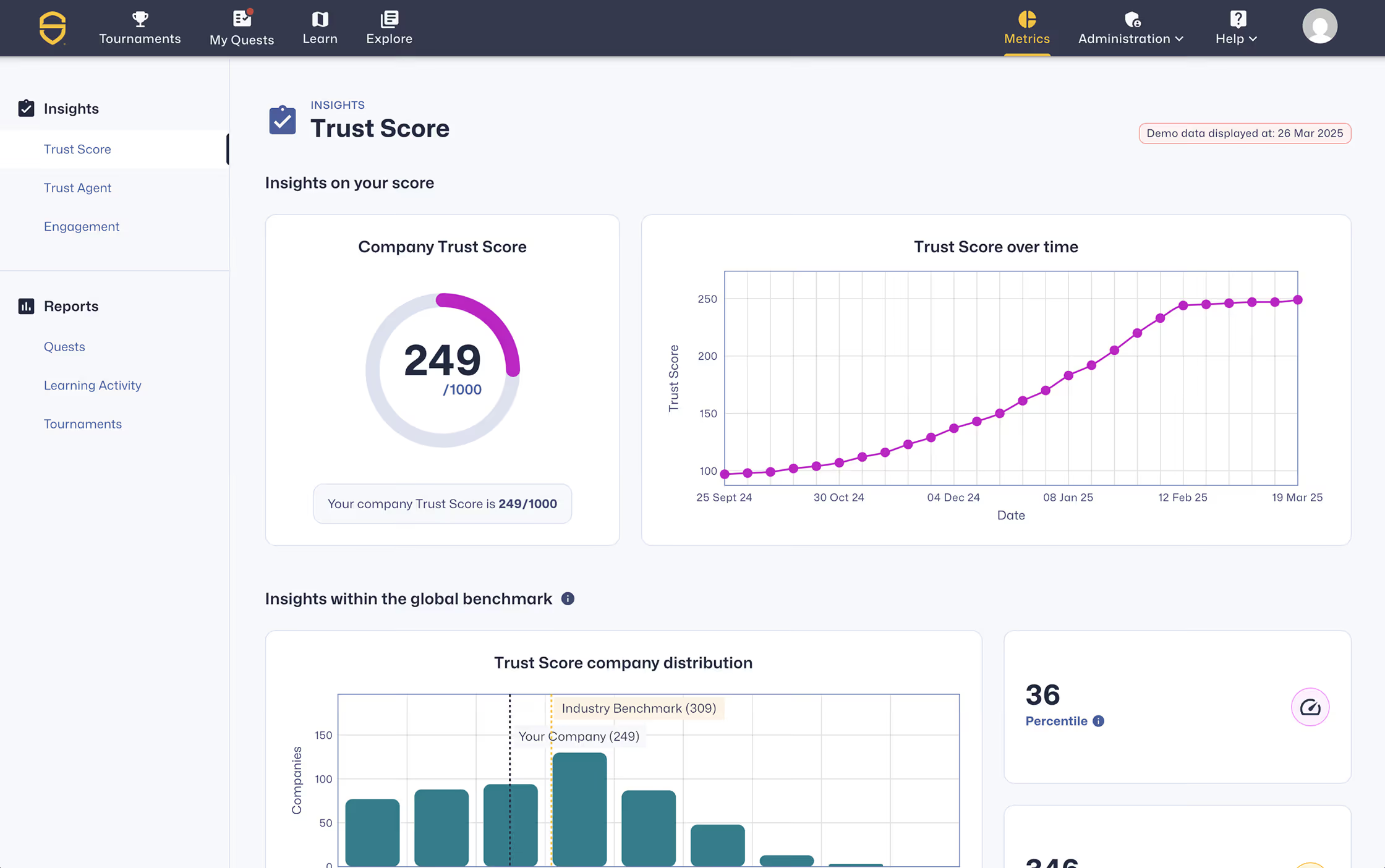
Once connected, your AI tool works with the same data behind your SCW dashboards: Trust Score, learning and Adaptive Learning activity, assessments, Quest engagement, and commit and vulnerability reporting.
Stay ahead of mandatory training
Annual training requirements are easiest to meet when you can see progress early. With the SCW MCP Server, you can check every team's progress toward a deadline whenever you need it, and know where to focus while there's still time.
Ask for progress by team, and build a dashboard in the conversation. Because the data is available to your AI tools, completion tracking can also feed into automations your team already runs, so it depends less on someone remembering to pull a report.
Try this prompt: "Show how every team is progressing on our [annual training Quest], and highlight where to focus."
Keep your curriculum aligned with current risk
A training program is the most valuable when it keeps pace with the vulnerabilities in your code. Refreshing one has traditionally meant days of setup in the platform. Now you can describe what you need: a curriculum for several roles and levels, a set of priority topics, or the vulnerability classes from your latest findings. Your AI tool matches what you need to SCW's available topics, languages, and courses, and creates draft Quests that follow your existing conventions, from objectives and naming to reminder schedules. Before you create anything, it can preview who a Quest applies to and how long it will take. A role-based training program that used to take more than a week to build can now be drafted in less than an hour. You review and publish each Quest in the platform.
Try this prompt: "We see too many CWE-79, CWE-89, and CWE-352 findings in our code. Draft a Quest that covers them and save it as a draft."
Show what your program is achieving
Leaders want to know whether the program is changing outcomes, not just whether people logged in. The SCW MCP Server lets you build that story from the same data as the platform: a progress dashboard for a steering meeting, or a before-and-after view that brings pre-assessment, Quest, tournament, and post-assessment results together. No more consolidating exports by hand.
Your AI tool does the analysis, so check key figures against the platform before you share them.
Try this prompt: "Compare pass rates on our pre-assessment and post-assessment for the developers who completed [Quest name], and summarize the improvement."
Put your SCW data to work
Combine SCW data with other sources your AI tool can reach, and use it for decisions beyond training. For example, pair Quest completion with your security champions list to run a recognition program, line up your strongest learners against areas of technical debt, or bring SCW results into reporting for each business unit.
Try this prompt: "Combine Quest completion with our security champions list and calculate points for each champion."
Access and security
Only SCW company admins can connect. Access uses your own SCW sign-in, requires your explicit consent, and can be revoked at any time from your AI tool's settings. Your AI tool sees only the data available to you in the platform, and the US and EU endpoints are fully separate.
Get started
The SCW MCP Server is available now on every SCW plan. Step-by-step instructions for your region and AI tool are in Setting up SCW's MCP Server.
It's the first step in bringing more of the SCW platform into the tools your team already uses, and one more way SCW helps teams adopt AI securely and stop AI software risk at the source.
Govern AI-driven development before it ships
Measure AI-assisted risk, enforce secure coding policy at commit, and accelerate secure delivery across your SDLC.
Explore more blogs
Access expert content on secure coding, AI governance, and software risk management.
Secure AI-driven development before it ships
See developer risk, enforce policy, and prevent vulnerabilities across your software development lifecycle.