

このオンラインJavaの落とし穴クイズをお試しください


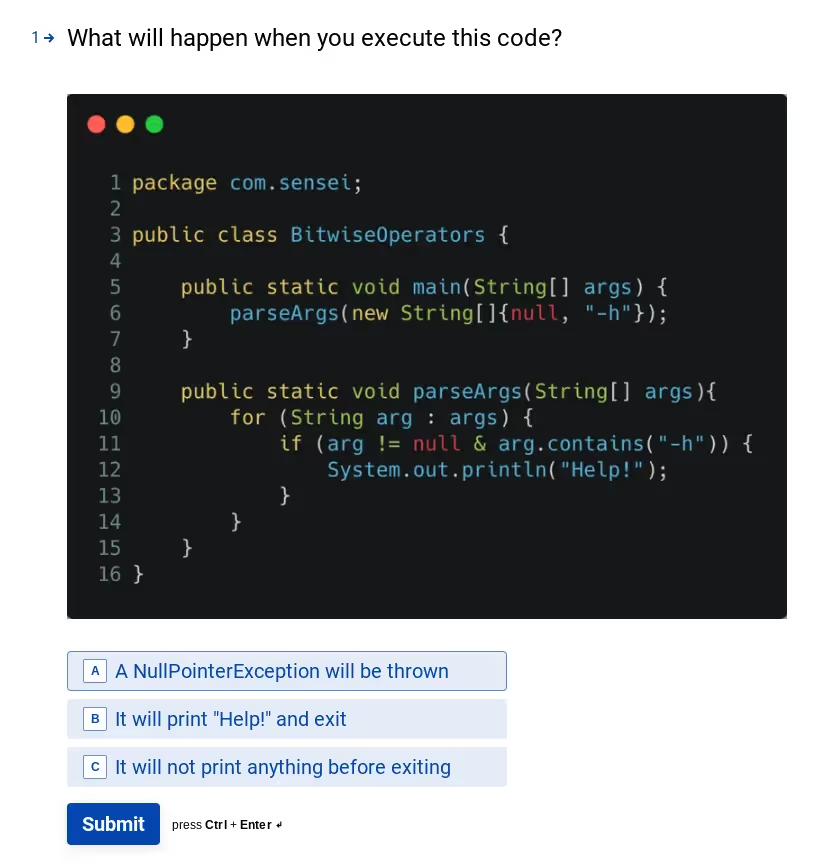
A previous blog post described the Java Gotcha "Bitwise vs Boolean Operator".
We added a variant of this, and some other Java Gotchas into a fun little Quiz called "Challenge The Sensei".
If you've read the blog post above then you'll be in a good place to ace at least one of the questions.
But your friends might not, so if you find the quiz fun, you can share it with them and see if they score as well as you.
Since we don't want to just quiz you. We want to try and use this to help educate and codify the knowledge. So we have created a Github repo that has runnable code examples for the problem, and the solution.
This is a Sensei enabled repo.
When you clone the repo and load it into IntelliJ, assuming you have the Secure Code Warrior Sensei IntelliJ Plugin installed, then it will automatically see that you have a .sensei folder, and load the Sensei recipes.
When browsing the code in the IDE you should see IntelliJ prompt you that the error exists in the code, and this should make it easier to see the gotcha in the code:
- Hover over the highlighted code then you'll see a prompt telling you about the error
- Use the Show Context Action key: alt+enter (Windows) option+enter (macOS) and we may have a QuickFix available that can fix the code.
Sensei recipes have been added for:
We are adding more recipes and more explanatory text to cover the rest of the code in the future... but don't let that stop you from having a look at the code and spotting the error yourself.
And remember to try the quiz and "Challenge the Sensei"

Alan Richardson は 20 年以上にわたり、開発者として、テスターからテスト責任者まで、テスト階層のあらゆるレベルで経験を積んできました。Secure Code Warrior の開発者リレーションズの責任者であり、チームと直接連携して、高品質で安全なコードの開発を改善しています。アランは、「ディア・イーブル・テスター」と「Java フォー・テスター」を含む4冊の本の著者です。また、アランはテクニカル・ウェブ・テストと Java を使った Selenium WebDriver を学ぶのに役立つオンライン・トレーニング・コースも作成しています。アランは SeleniumSimplified.com、EvilTester.com、JavaForTesters.com、CompendiumDev.co.uk にライティングとトレーニングのビデオを投稿しています。
Secure Code Warriorは、ソフトウェア開発ライフサイクル全体にわたってコードを保護し、サイバーセキュリティを最優先とする文化を築くお手伝いをします。アプリケーションセキュリティマネージャ、開発者、CISO、またはセキュリティ関係者のいずれであっても、安全でないコードに関連するリスクを軽減するお手伝いをします。
デモを予約


Alan Richardson は 20 年以上にわたり、開発者として、テスターからテスト責任者まで、テスト階層のあらゆるレベルで経験を積んできました。Secure Code Warrior の開発者リレーションズの責任者であり、チームと直接連携して、高品質で安全なコードの開発を改善しています。アランは、「ディア・イーブル・テスター」と「Java フォー・テスター」を含む4冊の本の著者です。また、アランはテクニカル・ウェブ・テストと Java を使った Selenium WebDriver を学ぶのに役立つオンライン・トレーニング・コースも作成しています。アランは SeleniumSimplified.com、EvilTester.com、JavaForTesters.com、CompendiumDev.co.uk にライティングとトレーニングのビデオを投稿しています。
A previous blog post described the Java Gotcha "Bitwise vs Boolean Operator".
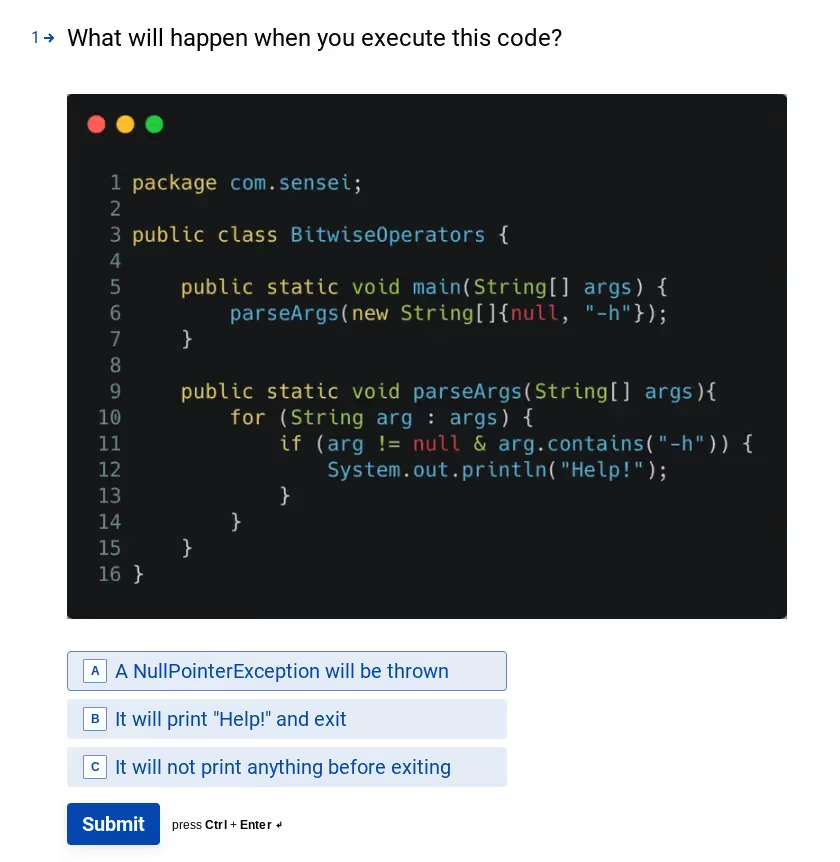
We added a variant of this, and some other Java Gotchas into a fun little Quiz called "Challenge The Sensei".
If you've read the blog post above then you'll be in a good place to ace at least one of the questions.
But your friends might not, so if you find the quiz fun, you can share it with them and see if they score as well as you.
Since we don't want to just quiz you. We want to try and use this to help educate and codify the knowledge. So we have created a Github repo that has runnable code examples for the problem, and the solution.
This is a Sensei enabled repo.
When you clone the repo and load it into IntelliJ, assuming you have the Secure Code Warrior Sensei IntelliJ Plugin installed, then it will automatically see that you have a .sensei folder, and load the Sensei recipes.
When browsing the code in the IDE you should see IntelliJ prompt you that the error exists in the code, and this should make it easier to see the gotcha in the code:
- Hover over the highlighted code then you'll see a prompt telling you about the error
- Use the Show Context Action key: alt+enter (Windows) option+enter (macOS) and we may have a QuickFix available that can fix the code.
Sensei recipes have been added for:
We are adding more recipes and more explanatory text to cover the rest of the code in the future... but don't let that stop you from having a look at the code and spotting the error yourself.
And remember to try the quiz and "Challenge the Sensei"


A previous blog post described the Java Gotcha "Bitwise vs Boolean Operator".
We added a variant of this, and some other Java Gotchas into a fun little Quiz called "Challenge The Sensei".
If you've read the blog post above then you'll be in a good place to ace at least one of the questions.
But your friends might not, so if you find the quiz fun, you can share it with them and see if they score as well as you.
Since we don't want to just quiz you. We want to try and use this to help educate and codify the knowledge. So we have created a Github repo that has runnable code examples for the problem, and the solution.
This is a Sensei enabled repo.
When you clone the repo and load it into IntelliJ, assuming you have the Secure Code Warrior Sensei IntelliJ Plugin installed, then it will automatically see that you have a .sensei folder, and load the Sensei recipes.
When browsing the code in the IDE you should see IntelliJ prompt you that the error exists in the code, and this should make it easier to see the gotcha in the code:
- Hover over the highlighted code then you'll see a prompt telling you about the error
- Use the Show Context Action key: alt+enter (Windows) option+enter (macOS) and we may have a QuickFix available that can fix the code.
Sensei recipes have been added for:
We are adding more recipes and more explanatory text to cover the rest of the code in the future... but don't let that stop you from having a look at the code and spotting the error yourself.
And remember to try the quiz and "Challenge the Sensei"
以下のリンクをクリックして、このリソースのPDFをダウンロードしてください。
Secure Code Warriorは、ソフトウェア開発ライフサイクル全体にわたってコードを保護し、サイバーセキュリティを最優先とする文化を築くお手伝いをします。アプリケーションセキュリティマネージャ、開発者、CISO、またはセキュリティ関係者のいずれであっても、安全でないコードに関連するリスクを軽減するお手伝いをします。
レポートを表示デモを予約
Alan Richardson は 20 年以上にわたり、開発者として、テスターからテスト責任者まで、テスト階層のあらゆるレベルで経験を積んできました。Secure Code Warrior の開発者リレーションズの責任者であり、チームと直接連携して、高品質で安全なコードの開発を改善しています。アランは、「ディア・イーブル・テスター」と「Java フォー・テスター」を含む4冊の本の著者です。また、アランはテクニカル・ウェブ・テストと Java を使った Selenium WebDriver を学ぶのに役立つオンライン・トレーニング・コースも作成しています。アランは SeleniumSimplified.com、EvilTester.com、JavaForTesters.com、CompendiumDev.co.uk にライティングとトレーニングのビデオを投稿しています。
A previous blog post described the Java Gotcha "Bitwise vs Boolean Operator".
We added a variant of this, and some other Java Gotchas into a fun little Quiz called "Challenge The Sensei".
If you've read the blog post above then you'll be in a good place to ace at least one of the questions.
But your friends might not, so if you find the quiz fun, you can share it with them and see if they score as well as you.
Since we don't want to just quiz you. We want to try and use this to help educate and codify the knowledge. So we have created a Github repo that has runnable code examples for the problem, and the solution.
This is a Sensei enabled repo.
When you clone the repo and load it into IntelliJ, assuming you have the Secure Code Warrior Sensei IntelliJ Plugin installed, then it will automatically see that you have a .sensei folder, and load the Sensei recipes.
When browsing the code in the IDE you should see IntelliJ prompt you that the error exists in the code, and this should make it easier to see the gotcha in the code:
- Hover over the highlighted code then you'll see a prompt telling you about the error
- Use the Show Context Action key: alt+enter (Windows) option+enter (macOS) and we may have a QuickFix available that can fix the code.
Sensei recipes have been added for:
We are adding more recipes and more explanatory text to cover the rest of the code in the future... but don't let that stop you from having a look at the code and spotting the error yourself.
And remember to try the quiz and "Challenge the Sensei"
目次
Alan Richardson は 20 年以上にわたり、開発者として、テスターからテスト責任者まで、テスト階層のあらゆるレベルで経験を積んできました。Secure Code Warrior の開発者リレーションズの責任者であり、チームと直接連携して、高品質で安全なコードの開発を改善しています。アランは、「ディア・イーブル・テスター」と「Java フォー・テスター」を含む4冊の本の著者です。また、アランはテクニカル・ウェブ・テストと Java を使った Selenium WebDriver を学ぶのに役立つオンライン・トレーニング・コースも作成しています。アランは SeleniumSimplified.com、EvilTester.com、JavaForTesters.com、CompendiumDev.co.uk にライティングとトレーニングのビデオを投稿しています。
Secure Code Warriorは、ソフトウェア開発ライフサイクル全体にわたってコードを保護し、サイバーセキュリティを最優先とする文化を築くお手伝いをします。アプリケーションセキュリティマネージャ、開発者、CISO、またはセキュリティ関係者のいずれであっても、安全でないコードに関連するリスクを軽減するお手伝いをします。
デモを予約[ダウンロード]始めるためのリソース


始めるためのリソース
%20thumbnail.png)

Secure coding learning that reflects real AI usage
Align secure coding training to real AI development activity — automatically assigning guidance to developers using AI tools, without manual intervention.Align secure coding training to real AI development activity — automatically assigning guidance to developers using AI tools, without manual intervention.