Verstehen Sie den Path-Traversal-Bug im tarfile-Modul von Python

Kürzlich entdeckte ein Team von Sicherheitsforschern einen fünfzehn Jahre alten Fehler in der Tar-Datei-Extraktionsfunktion von Python. Die Schwachstelle wurde erstmals 2007 offengelegt und unter CVE-2007-4559 erfasst. Ein entsprechender Hinweis wurde zwar in die offizielle Python-Dokumentation aufgenommen, der Fehler selbst blieb jedoch ungepatcht.
Diese Schwachstelle könnte Tausende von Softwareprojekten betreffen, doch vielen ist die Situation oder der richtige Umgang damit nicht bekannt. Deshalb geben wir Ihnen hier bei Secure Code Warrior die Möglichkeit, die Ausnutzung dieser Schwachstelle selbst zu simulieren. So können Sie die Auswirkungen aus erster Hand erleben und praktische Erfahrungen mit den Mechanismen dieses hartnäckigen Fehlers sammeln, um Ihre Anwendung besser zu schützen!
Probieren Sie die simulierte Mission jetzt aus.
Die Schwachstelle: Path Traversal bei der Extraktion von Tar-Dateien
Path oder Directory Traversal tritt auf, wenn nicht bereinigte Benutzereingaben zum Erstellen eines Dateipfads verwendet werden. Dies ermöglicht es einem Angreifer, auf Dateien zuzugreifen, diese zu überschreiben oder sogar beliebigen Code auszuführen.
Die Schwachstelle existiert im Python-Modul tarfile. Eine Tar-Datei (Tape Archive) ist eine einzelne Datei, ein sogenanntes Archiv. Sie bündelt mehrere Dateien zusammen mit ihren Metadaten und ist meist an der Endung .tar.gz oder .tgz zu erkennen. Jedes Element im Archiv kann durch ein TarInfo-Objekt dargestellt werden, das Metadaten wie Dateiname, Änderungszeit, Eigentümer und mehr enthält.
Das Risiko ergibt sich aus der Möglichkeit, Archive wieder zu extrahieren.
Bei der Extraktion benötigt jedes Element einen Pfad, unter dem es gespeichert wird. Dieser Speicherort wird durch die Verknüpfung des Basispfads mit dem Dateinamen erstellt:

Sobald dieser Pfad erstellt ist, wird er an die Funktionen tarfile.extract oder tarfile.extractall übergeben, um die Extraktion durchzuführen:
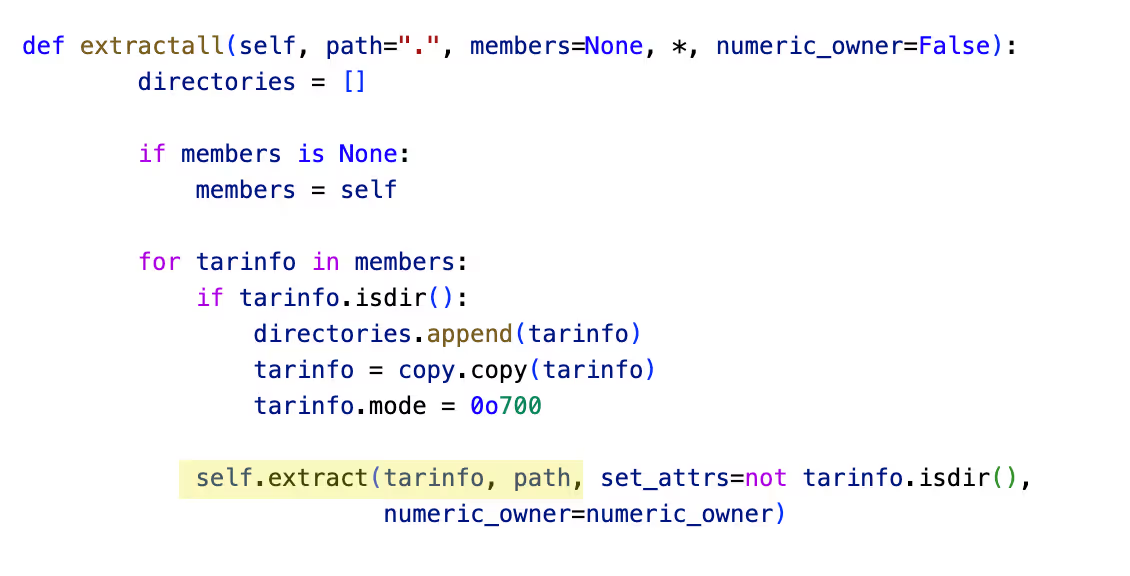
Das Problem hierbei ist die fehlende Bereinigung des Dateinamens. Ein Angreifer könnte Dateien so umbenennen, dass sie Path-Traversal-Zeichen wie Punkt-Punkt-Slash (../) enthalten. Dies würde dazu führen, dass die Datei das vorgesehene Verzeichnis verlässt und beliebige Dateien überschreibt. Dies könnte letztlich zu einer Remote Code Execution führen, die leicht auszunutzen ist.
Die Schwachstelle tritt auch in anderen Szenarien auf, wenn man weiß, wie man sie erkennt. Neben der Handhabung von Tar-Dateien in Python existiert die Schwachstelle auch bei der Extraktion von Zip-Dateien. Vielleicht kennen Sie dies unter einem anderen Namen, wie der Zip-Slip-Schwachstelle, die sich auch in anderen Sprachen als Python manifestiert hat!
Wie können Sie das Risiko mindern?
Obwohl die Schwachstelle seit Jahren bekannt ist, betrachten die Python-Maintainer die Extraktionsfunktionalität als bestimmungsgemäß. In diesem Fall sagen manche: „Es ist ein Feature, kein Bug.“ Leider können Entwickler nicht immer vermeiden, Tar- oder Zip-Dateien aus einer unbekannten Quelle zu extrahieren. Es liegt an ihnen, die nicht vertrauenswürdigen Eingaben als Teil sicherer Entwicklungspraktiken zu bereinigen, um Path-Traversal-Schwachstellen zu verhindern.
Möchten Sie mehr darüber erfahren, wie Sie sicheren Code schreiben und Risiken mit Python minimieren?
Probieren Sie unsere Python-Challenge kostenlos aus.
Wenn Sie an weiteren kostenlosen Coding-Richtlinien interessiert sind, besuchen Sie Secure Code Coach, um bei sicheren Programmierpraktiken stets auf dem Laufenden zu bleiben.
Kontrollieren Sie KI-gestützte Entwicklung, bevor sie in Produktion geht
Bewerten Sie KI-gestützte Risiken, setzen Sie Richtlinien für sicheren Code direkt beim Commit durch und beschleunigen Sie die sichere Bereitstellung über Ihren gesamten SDLC hinweg.
Weitere Blogs entdecken
Erhalten Sie Zugang zu Experteninhalten über sichere Programmierung, KI-Governance und Software-Risikomanagement.
%252520%252520(3).avif)
Supercharged Security Awareness: How Tournaments are Inspiring Developers at Erste Group
Lorem ipsum dolor sit amet, consectetur adipiscing elit. Suspendisse varius enim in eros elementum tristique. Duis cursus, mi quis viverra ornare, eros dolor interdum nulla, ut commodo diam libero vitae erat. Aenean faucibus nibh et justo cursus id rutrum lorem imperdiet. Nunc ut sem vitae risus tristique posuere.

Security as culture: How Blue Prism cultivates world-class secure developers
Learn how Blue Prism, the global leader in intelligent automation for the enterprise, used Secure Code Warrior's agile learning platform to create a security-first culture with their developers, achieve their business goals, and ship secure code at speed

Eine Sicherheitskultur: Wie Sage sein Champions-Programm aufgebaut hat
Erfahren Sie, wie Sage die Sicherheit durch einen flexiblen, beziehungsorientierten Ansatz gestärkt, über 200 Security Champions ausgebildet und eine messbare Risikoreduzierung erzielt hat.
Cybersecurity Awareness Month 2026: Das Verständnis von KI-Sicherheit ist entscheidend für die Unternehmensverteidigung
Wir haben einen Punkt erreicht, an dem die meisten führenden KI-Unternehmen öffentlich eine weltweite Verlangsamung der KI-Entwicklung gefordert haben, damit die Sicherheitsvorkehrungen Schritt halten können. Doch die Wahrheit ist: Ernsthafte Sicherheitsprobleme sind bereits Realität geworden. Dies bringt unzählige Sicherheitsverantwortliche und Führungsteams in eine dringliche Lage, da die finanziellen Kosten und Risiken durch die Implementierung von KI stetig steigen.
Enabler 8: Branding für Ihr Programm
Ein Programm für sicheres Programmieren braucht mehr als nur großartige Inhalte, um erfolgreich zu sein. Enabler 8 zeigt, wie Branding die Teilnahme zu einem begehrten, statusorientierten Erlebnis macht.
.avif)
Jeder Mitarbeiter steht jetzt an vorderster Front der KI-Cybersicherheit
Die Unternehmenslandschaft wandelt sich mit einer Geschwindigkeit, die kaum jemand vorhergesehen hat, bis es zu spät war. Wir haben offiziell die Schwelle von handgeschriebenem Code und einfacher Copilot-Unterstützung hin zur Ära des Agentic Development Lifecycle (ADLC) überschritten. Während autonome KI-Agenten eine beispiellose Effizienz in vielen Bereichen versprechen, bringen sie auch eine völlig neue Klasse von Sicherheits- und Regulierungsrisiken mit sich.
Sichere KI-gestützte Entwicklung vor dem Release
Erkennen Sie Entwicklerrisiken, setzen Sie Richtlinien durch und verhindern Sie Schwachstellen über den gesamten Softwareentwicklungszyklus hinweg.
