Migrating to a Logger with Sensei

Migrating to a Logger with Sensei
This post describes creating a recipe to migrate from System.out.println to using a Java Logger.
When I'm hacking out code, rather than using TDD, and I make mistakes, I have the bad habit of printing a line to System.out, and I've wanted to wean myself off that habit.
I made a bunch of mistakes when writing the code below :
private String getCountdownString() {
String output = "";
String prefix="";
for(int countdown = 10; countdown > 0; countdown-- ){
output = output + prefix + countdown;
System.out.println(output);
prefix=", ";
}
System.out.println(output);
return output;
}
Initially, I wrote countdown++ and the loop didn't finish.
And I used countdown > 1 so didn't get the output I wanted.
In the end, I littered my code with System.out.println to help me debug. And the experience reinforced that I need to learn how to use a logger as my default approach.
Research
Fortunately, I read through the Sensei documentation and decided to use the "Getting Started" guide to help me create a recipe to convert from System.out.println and encourage me to use a logger:
- java.util.logging.Logger
Creating a Recipe
The first thing I do is click on the println then alt+enter to create a new recipe.

I create it with the following details:
Name: Logger: use logger instead of println
Description: use logger instead of println - remember to stop using System.out.println
Level: Error
And I'll start by matching methodcall with the name println
search:
methodcall:
name: "println"
And the preview shows me all the matches in my code.
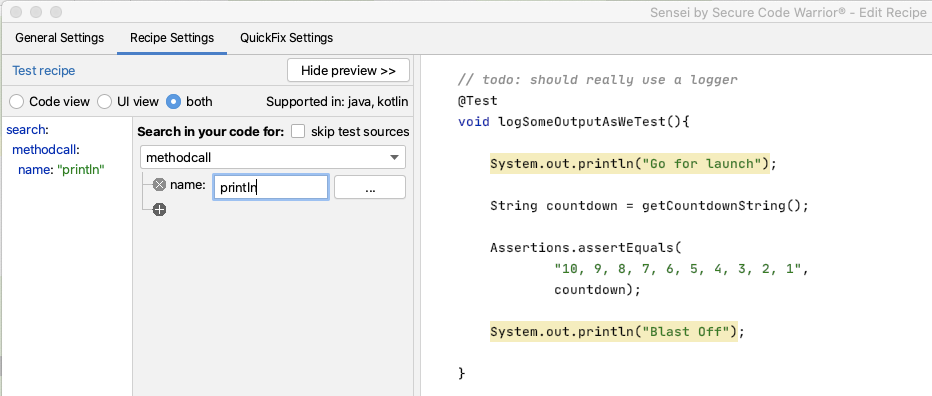
I can see that all the matches in my code are for System.out.println but I don't trust that long term this will be the only match. I want to match a more qualified statement I want to change.
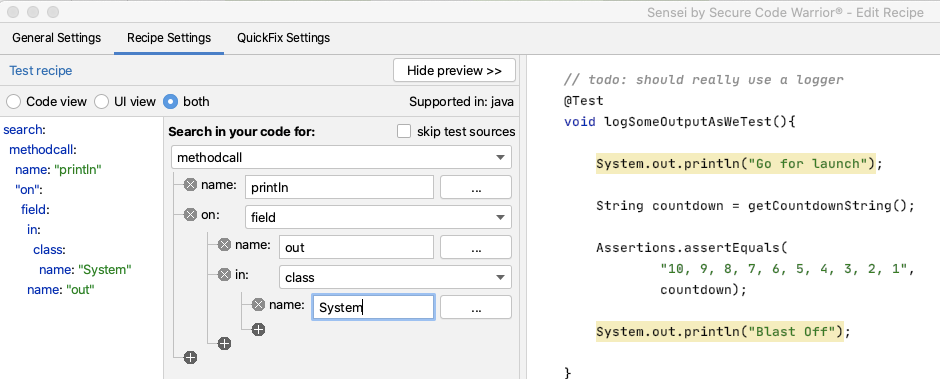
I expand the matcher to search for a methodcall on a field named out in the class System.
search:
methodcall:
name: "println"
"on":
field:
in:
class:
name: "System"
name: "out"
I could, if I wanted, fully qualify the System name to java.lang.System
Amending the Code to log
Next, I want to create the QuickFix.
First I want to amend the line of code that logs the output:
availableFixes:
- name: "use Logger"
actions:
- rewrite:
to: "logger.log(Level.INFO, {{{ arguments.0 }}})"
I don't have to remember the mustache template format. I used the Show Variables in the GUI to show me the argument and double-clicked on it. Then the GUI filled in the appropriate matching mustache template.
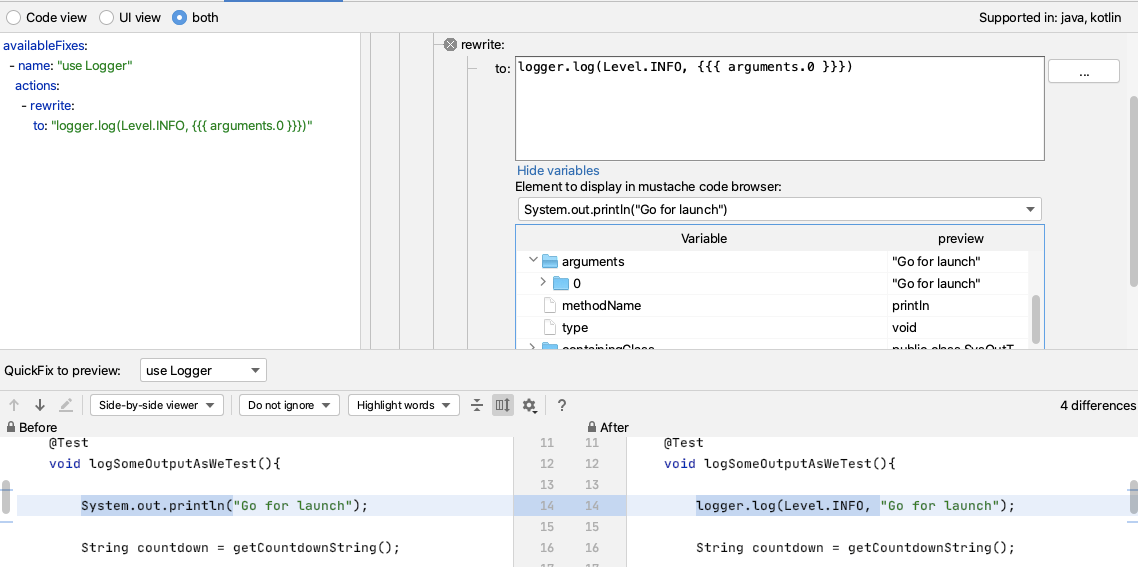
When I try it out, I can see that I still have to alt+enter to import the Level enum. But if I amend my QuickFix to have a fully qualified item then Sensei will add the import for me e.g.
- It will replace System.out.println(output); with
logger.log(Level.INFO, output);
- And add an import for the enum:
import java.util.logging.Level;
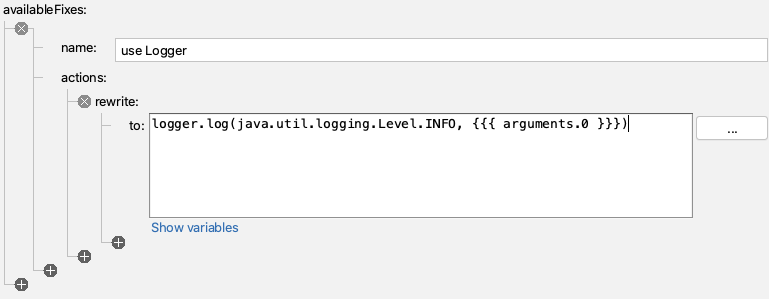
- If I rewrite to:
logger.log(java.util.logging.Level.INFO, {{{ arguments.0 }}})
And this will work, but I will still have to remember the syntax to instantiate the logger in the first place.
Amending the code to add the logger field
I can amend my QuickFix to create the field for me as well.
I will code the logger first, and then add that to my recipe so I never have to code it again.
Logger logger2 = Logger.getLogger(SysOutTest.class.getName());
I tend to write the example code I want to see generated first because then I can use IntelliJ code completion and syntax checking to make sure I get it right. As a side-effect, it will then be in the code preview when I edit the recipe to add the QuickFix lines that will create that code.
And when I write the example code, I want to use a different field name (here I'm using logger2) because Sensei is clever enough not to add a duplicate field, so I have to fool it by using a different name.
So I'll amend the recipe to create this code by adding a field called logger.
availableFixes:
- name: "use Logger"
actions:
- rewrite:
to: "logger.log(java.util.logging.Level.INFO, {{{ arguments.0 }}})"
- addField:
field: "java.util.logging.Logger logger = Logger.getLogger({{{ containingClass.name\
\ }}}.class.getName())"
target: "parentClass"
Note that I changed SysOutTest to be a mustache variable so that it picks up the name of any class I use this recipe in. And again, I didn't remember the mustache syntax, I used the GUI Show Variables to find the replacement I needed.
By fully qualifying the Logger to java.util.logging.Logger, Sensei will add the import and write the line of code that I want i.e.
Logger logger = Logger.getLogger(SysOutTest.class.getName());
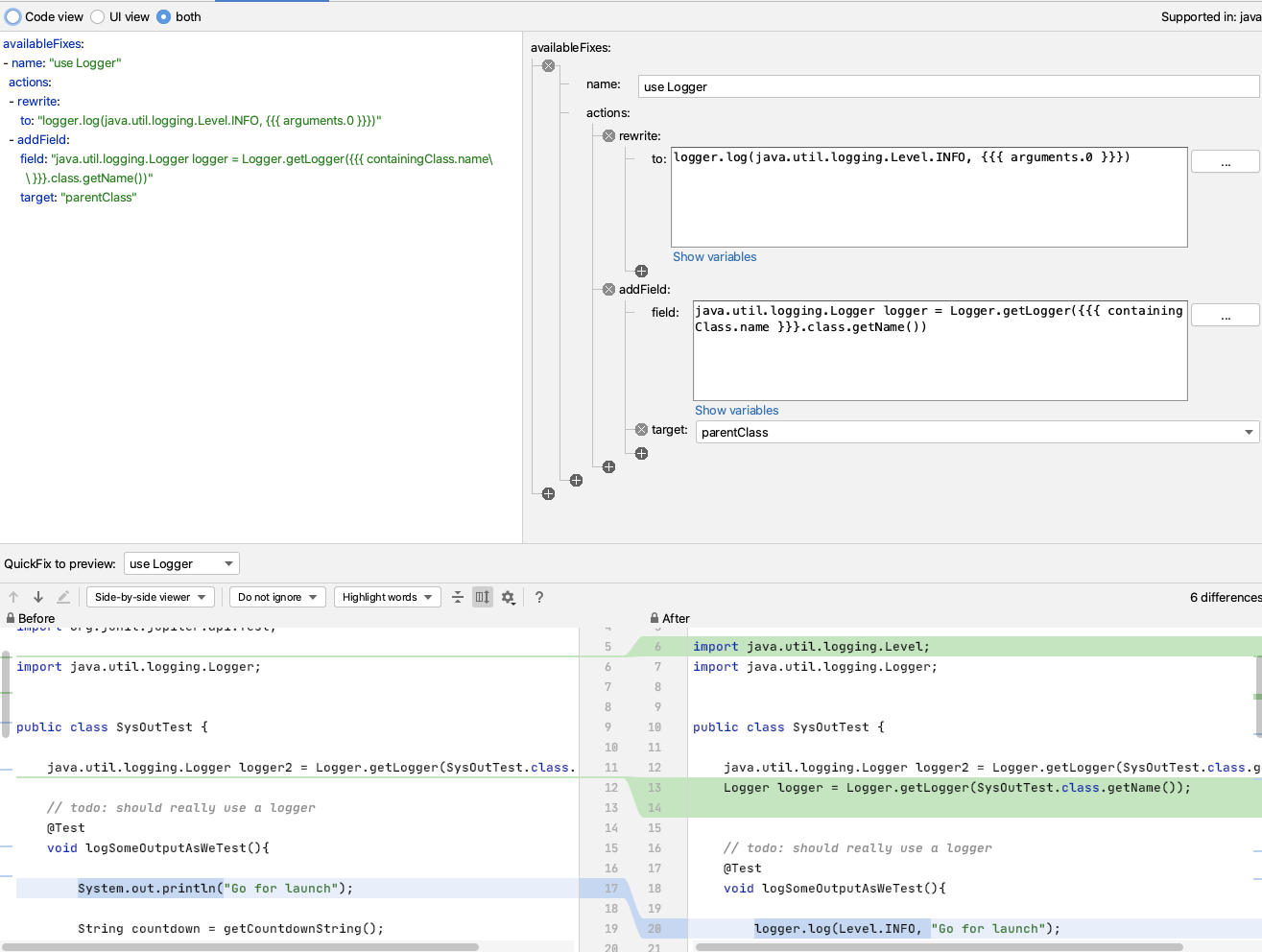
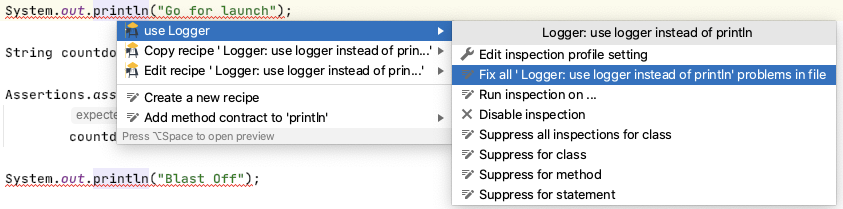
One useful thing about this recipe is that because it will only add the logger field once, I can use this on any existing code where I have used `System.out.println` and use Sensei to change all the occurrences in my code file at the same time.
Next Steps
Once I get used to this, I'll eventually train myself away from using System.out.println.
I can use Sensei to help me proactively write code by creating a second recipe which helps me create a logger.
e.g. I can match on a class, where there is no field called logger, and add one.
If I create a recipe of level Information
Name: Logger: add logger
Description: Add logger to class
To match on a class without a logger field:
search:
class:
without:
child:
field:
name: "logger"
And then I will reuse part of the QuickFix we saw earlier:
availableFixes:
- name: "Add Logger"
actions:
- addField:
field: "java.util.logging.Logger logger = Logger.getLogger({{{ containingClass.name\
\ }}}.class.getName())"
target: "self"
Note the difference in target here compared to the first QuickFix. This uses self because our Search matched the class. The first QuickFix uses parentClass because we matched code within the class itself.
Summary
This represents one of the key flows associated with using Sensei to help improve your personal programming skillset:
- create a recipe to help with your immediate 'best practice'
- once you know how to use that best practice... create a recipe to make your workflow faster
---
You can install Sensei from within IntelliJ using "Preferences \ Plugins" (Mac) or "Settings \ Plugins" (Windows) then just search for "sensei secure code".
The source code and recipes for this can be found in the `sensei-blog-examples` repository in the Secure Code Warrior GitHub account, in the `pojoexamples` module.
Controle el desarrollo impulsado por IA antes de su lanzamiento
Mida el riesgo asistido por IA, aplique políticas de codificación segura en el momento de la confirmación y acelere la entrega segura en todo su ciclo de vida de desarrollo de software (SDLC).
Explorar más blogs
Acceda a contenido especializado sobre programación segura, gobernanza de IA y gestión de riesgos de software.

Una cultura de seguridad: cómo Sage creó su programa de defensores
Descubre cómo Sage reforzó su seguridad con un enfoque flexible y centrado en las relaciones, logrando formar a más de 200 expertos en seguridad y alcanzar una reducción de riesgos cuantificable.

Kamer van Koophandel: Seguridad a escala impulsada por los desarrolladores
La Cámara de Comercio (Kamer van Koophandel) comparte cómo integró la programación segura en el desarrollo diario mediante certificaciones basadas en roles, evaluaciones comparativas de puntuación de confianza y una cultura de responsabilidad compartida en seguridad.

Cómo un «Juego de Códigos» guía a IAG Group hacia un futuro de programación más seguro
IAG Group es la entidad detrás de muchas de las principales compañías de seguros en la región de Asia-Pacífico, que suscribe pólizas para millones de clientes por un valor aproximado de 11.400 millones de dólares australianos en primas anuales.
Mes de la Concienciación sobre Ciberseguridad 2026: Comprender la seguridad de la IA es fundamental para la defensa empresarial
Hemos llegado a un punto en el que la mayoría de las principales empresas de IA han pedido públicamente una ralentización global en el desarrollo de la IA para que las medidas de seguridad puedan ponerse al día, pero la verdad es que ya se han materializado graves problemas de seguridad. Esto deja a innumerables líderes de seguridad y equipos ejecutivos en una situación urgente, a medida que los costes monetarios y de riesgo de la implementación de la IA siguen acumulándose.
Habilitador 8: Branding de su programa
Un programa de codificación segura necesita algo más que un buen contenido para tener éxito. El Habilitador 8 muestra cómo el branding transforma la participación en una experiencia codiciada basada en el estatus.
.avif)
Cada empleado está ahora en la primera línea de la ciberseguridad de la IA
El panorama tecnológico empresarial está cambiando a una velocidad que pocos previeron hasta que fue demasiado tarde. Hemos cruzado oficialmente el umbral del código escrito por humanos y la asistencia básica de copilotos hacia la era del Ciclo de Vida de Desarrollo Agéntico (ADLC). Si bien los agentes de IA autónomos prometen una eficiencia sin precedentes en múltiples funciones, también traen consigo una clase completamente nueva de riesgos regulatorios y de seguridad.
Proteja el desarrollo basado en IA antes de su lanzamiento
Identifique riesgos de desarrollo, aplique políticas y prevenga vulnerabilidades en todo el ciclo de vida de su software.
