

Comment éviter les erreurs Java courantes

Be a more productive Java developer
With 9 million developers globally*, Java (Oracle Corporation) is among the most popular programming languages in the world. Many application frameworks have been built on Java because it is a very versatile language that can run programs on many different devices that support Java Runtime Environment (JRE) - an environment in which all Java programs run. The developer-led communities are very active and the in-depth support available to new programmers contributes to its ever-growing popularity.
Since Java has been around for a long time, the communities have spent years developing standards, tools, coding patterns, and mitigating common mistakes that developers face time and again. All such community-led initiatives have one common objective - to help developers be as productive as possible when they are developing applications with Java. But when it comes to applying the best practices or patterns in application code, the responsibility lies with the developer. The enforcement of good practices is quite varied and therefore makes it difficult to have a standard approach to a coding practice when opinions differ a lot within the communities. The developers resort to finding help in online communities which sometimes can, inadvertently, give you insecure solutions to your coding problems.
To help developers implement secure solutions to common Java coding problems, we created Sensei - an IntelliJ plugin to correct bad coding patterns as per recipe (or rules) defined by you or your organization in a professional environment. Sensei enables developers to identify and correct common Java mistakes (gotchas) with a single click.
Continue reading to know how Sensei increases developer productivity by resolving some common Java coding mistakes.
A recurring mistake that frustrates developers
One example of those common mistakes is the incorrect equality check of wrapper values. Values of boxed primitives should be compared using the equals method instead of the reference comparison operator (==) to prevent unexpected results.
As an example, using the reference comparison operator for Integer values in the range -128 to 127 will (usually) behave the same as the equals method. However, if we perform the same comparison with values outside this range, the results will differ. This is due to Java maintaining a constant pool for the mentioned range of Integer values. Using the equals method will always yield the expected results and is therefore the right way to compare.
In this example, we are incorrectly using the operator (==) to check equality.
Which results in the following output:
true
false
false
true
The right way to compare is to use the equals method.
And then the output would be:
true
false
true
false
This well-known best practice has been around for quite some time and yet is often implemented incorrectly in legacy code waiting to raise its ugly head at the most inopportune time. So we created recipes (or rules) that help identify such undesirable coding patterns locally and apply a fix with a single click using Sensei.
Sensei is a highly customizable IDE plugin to scan and fix undesirable code as you type - with hundreds of downloadable code transformations and migration recipes (rules) as well as an in-built ability to craft your own. With Sensei, developers can remediate bad code patterns as they type so that they can deliver quality code faster and, ultimately write it in a consistent and standard way across teams and projects.
How Sensei fixes such common Java issues
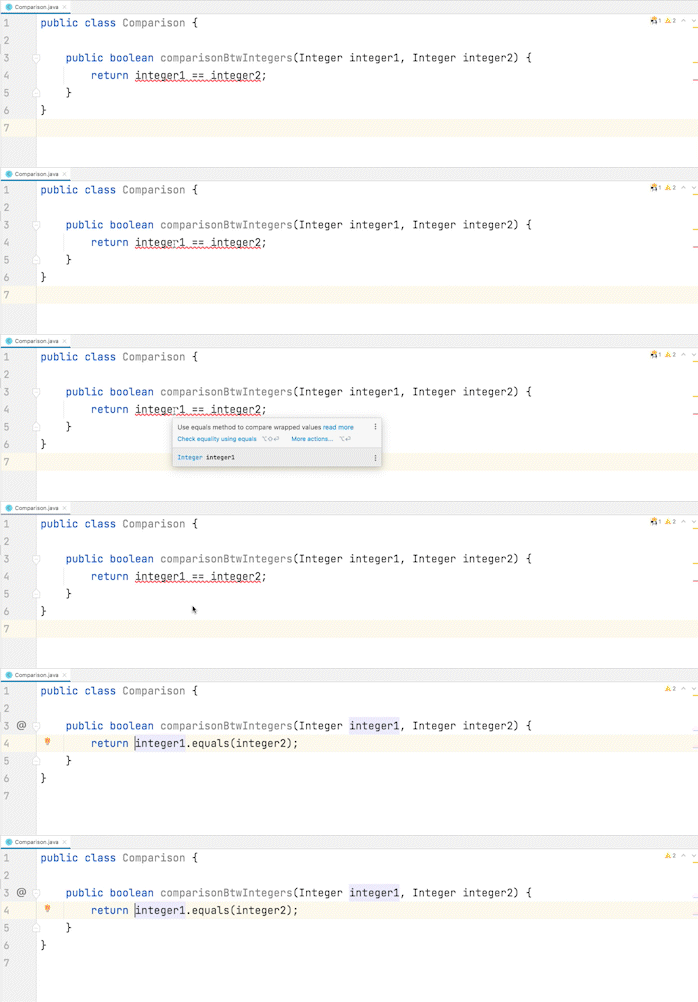
As Sensei allows you to create your own recipes, we created a recipe to correct the above-mentioned mistake.
For this example, we want to find where we are using the comparison operator (==) in boxed primitive type.
A Sensei recipe looks like this (in YAML):
The above can search for the recurring bad pattern as you type or the entire file, configured scope, and even, the full codebase. Once the pattern is found, the natural next step is to be able to fix it instantly without having to search online. Sensei enables you to create fixes that can add/edit/delete code as specified. You can even provide multiple fixes as you see fit allowing developers to choose the most appropriate fix as they see fit.
In our example, we want to rewrite the comparison using the equals method instead of the operator (==).
An available fix is described like this:
How it works:
Implementing standard coding guidelines the easy way
Java Gotchas Cookbook has 22 recipes to help you to avoid common mistakes and keep your code clean and safe. It detects incorrect or unsafe use of various Java language features and APIs, such as object equality, exception handling, regular expressions and collections. By adopting Sensei and this cookbook, you can start writing better code from the start and even, create your own recipes to suit your unique team, project, or organization.
This is just one example of the many ways Sensei can be used to standardize your projects. You can always be on the lookout for anti-patterns or certain manual code transformations that you frequently come across in pull requests or as you code yourself. If you have a set of coding guidelines that are often missed by developers then you could convert the guidelines into recipes - enabling developers to apply approved code transformations with confidence.
Install Sensei now and enable Java Gotchas Cookbook for a productive development experience. https://sensei.securecodewarrior.com/cookbooks/scw:java
*2021, State of Developer Nation, https://www.developernation.net/developer-reports/de20
Secure Code Warrior est là pour aider votre organisation à sécuriser le code tout au long du cycle de développement logiciel et à créer une culture dans laquelle la cybersécurité est une priorité. Que vous soyez responsable de la sécurité des applications, développeur, responsable de la sécurité informatique ou toute autre personne impliquée dans la sécurité, nous pouvons aider votre organisation à réduire les risques associés à un code non sécurisé.
Réservez une démo




Be a more productive Java developer
With 9 million developers globally*, Java (Oracle Corporation) is among the most popular programming languages in the world. Many application frameworks have been built on Java because it is a very versatile language that can run programs on many different devices that support Java Runtime Environment (JRE) - an environment in which all Java programs run. The developer-led communities are very active and the in-depth support available to new programmers contributes to its ever-growing popularity.
Since Java has been around for a long time, the communities have spent years developing standards, tools, coding patterns, and mitigating common mistakes that developers face time and again. All such community-led initiatives have one common objective - to help developers be as productive as possible when they are developing applications with Java. But when it comes to applying the best practices or patterns in application code, the responsibility lies with the developer. The enforcement of good practices is quite varied and therefore makes it difficult to have a standard approach to a coding practice when opinions differ a lot within the communities. The developers resort to finding help in online communities which sometimes can, inadvertently, give you insecure solutions to your coding problems.
To help developers implement secure solutions to common Java coding problems, we created Sensei - an IntelliJ plugin to correct bad coding patterns as per recipe (or rules) defined by you or your organization in a professional environment. Sensei enables developers to identify and correct common Java mistakes (gotchas) with a single click.
Continue reading to know how Sensei increases developer productivity by resolving some common Java coding mistakes.
A recurring mistake that frustrates developers
One example of those common mistakes is the incorrect equality check of wrapper values. Values of boxed primitives should be compared using the equals method instead of the reference comparison operator (==) to prevent unexpected results.
As an example, using the reference comparison operator for Integer values in the range -128 to 127 will (usually) behave the same as the equals method. However, if we perform the same comparison with values outside this range, the results will differ. This is due to Java maintaining a constant pool for the mentioned range of Integer values. Using the equals method will always yield the expected results and is therefore the right way to compare.
In this example, we are incorrectly using the operator (==) to check equality.
Which results in the following output:
true
false
false
true
The right way to compare is to use the equals method.
And then the output would be:
true
false
true
false
This well-known best practice has been around for quite some time and yet is often implemented incorrectly in legacy code waiting to raise its ugly head at the most inopportune time. So we created recipes (or rules) that help identify such undesirable coding patterns locally and apply a fix with a single click using Sensei.
Sensei is a highly customizable IDE plugin to scan and fix undesirable code as you type - with hundreds of downloadable code transformations and migration recipes (rules) as well as an in-built ability to craft your own. With Sensei, developers can remediate bad code patterns as they type so that they can deliver quality code faster and, ultimately write it in a consistent and standard way across teams and projects.
How Sensei fixes such common Java issues
As Sensei allows you to create your own recipes, we created a recipe to correct the above-mentioned mistake.
For this example, we want to find where we are using the comparison operator (==) in boxed primitive type.
A Sensei recipe looks like this (in YAML):
The above can search for the recurring bad pattern as you type or the entire file, configured scope, and even, the full codebase. Once the pattern is found, the natural next step is to be able to fix it instantly without having to search online. Sensei enables you to create fixes that can add/edit/delete code as specified. You can even provide multiple fixes as you see fit allowing developers to choose the most appropriate fix as they see fit.
In our example, we want to rewrite the comparison using the equals method instead of the operator (==).
An available fix is described like this:
How it works:
Implementing standard coding guidelines the easy way
Java Gotchas Cookbook has 22 recipes to help you to avoid common mistakes and keep your code clean and safe. It detects incorrect or unsafe use of various Java language features and APIs, such as object equality, exception handling, regular expressions and collections. By adopting Sensei and this cookbook, you can start writing better code from the start and even, create your own recipes to suit your unique team, project, or organization.
This is just one example of the many ways Sensei can be used to standardize your projects. You can always be on the lookout for anti-patterns or certain manual code transformations that you frequently come across in pull requests or as you code yourself. If you have a set of coding guidelines that are often missed by developers then you could convert the guidelines into recipes - enabling developers to apply approved code transformations with confidence.
Install Sensei now and enable Java Gotchas Cookbook for a productive development experience. https://sensei.securecodewarrior.com/cookbooks/scw:java
*2021, State of Developer Nation, https://www.developernation.net/developer-reports/de20


Be a more productive Java developer
With 9 million developers globally*, Java (Oracle Corporation) is among the most popular programming languages in the world. Many application frameworks have been built on Java because it is a very versatile language that can run programs on many different devices that support Java Runtime Environment (JRE) - an environment in which all Java programs run. The developer-led communities are very active and the in-depth support available to new programmers contributes to its ever-growing popularity.
Since Java has been around for a long time, the communities have spent years developing standards, tools, coding patterns, and mitigating common mistakes that developers face time and again. All such community-led initiatives have one common objective - to help developers be as productive as possible when they are developing applications with Java. But when it comes to applying the best practices or patterns in application code, the responsibility lies with the developer. The enforcement of good practices is quite varied and therefore makes it difficult to have a standard approach to a coding practice when opinions differ a lot within the communities. The developers resort to finding help in online communities which sometimes can, inadvertently, give you insecure solutions to your coding problems.
To help developers implement secure solutions to common Java coding problems, we created Sensei - an IntelliJ plugin to correct bad coding patterns as per recipe (or rules) defined by you or your organization in a professional environment. Sensei enables developers to identify and correct common Java mistakes (gotchas) with a single click.
Continue reading to know how Sensei increases developer productivity by resolving some common Java coding mistakes.
A recurring mistake that frustrates developers
One example of those common mistakes is the incorrect equality check of wrapper values. Values of boxed primitives should be compared using the equals method instead of the reference comparison operator (==) to prevent unexpected results.
As an example, using the reference comparison operator for Integer values in the range -128 to 127 will (usually) behave the same as the equals method. However, if we perform the same comparison with values outside this range, the results will differ. This is due to Java maintaining a constant pool for the mentioned range of Integer values. Using the equals method will always yield the expected results and is therefore the right way to compare.
In this example, we are incorrectly using the operator (==) to check equality.
Which results in the following output:
true
false
false
true
The right way to compare is to use the equals method.
And then the output would be:
true
false
true
false
This well-known best practice has been around for quite some time and yet is often implemented incorrectly in legacy code waiting to raise its ugly head at the most inopportune time. So we created recipes (or rules) that help identify such undesirable coding patterns locally and apply a fix with a single click using Sensei.
Sensei is a highly customizable IDE plugin to scan and fix undesirable code as you type - with hundreds of downloadable code transformations and migration recipes (rules) as well as an in-built ability to craft your own. With Sensei, developers can remediate bad code patterns as they type so that they can deliver quality code faster and, ultimately write it in a consistent and standard way across teams and projects.
How Sensei fixes such common Java issues
As Sensei allows you to create your own recipes, we created a recipe to correct the above-mentioned mistake.
For this example, we want to find where we are using the comparison operator (==) in boxed primitive type.
A Sensei recipe looks like this (in YAML):
The above can search for the recurring bad pattern as you type or the entire file, configured scope, and even, the full codebase. Once the pattern is found, the natural next step is to be able to fix it instantly without having to search online. Sensei enables you to create fixes that can add/edit/delete code as specified. You can even provide multiple fixes as you see fit allowing developers to choose the most appropriate fix as they see fit.
In our example, we want to rewrite the comparison using the equals method instead of the operator (==).
An available fix is described like this:
How it works:
Implementing standard coding guidelines the easy way
Java Gotchas Cookbook has 22 recipes to help you to avoid common mistakes and keep your code clean and safe. It detects incorrect or unsafe use of various Java language features and APIs, such as object equality, exception handling, regular expressions and collections. By adopting Sensei and this cookbook, you can start writing better code from the start and even, create your own recipes to suit your unique team, project, or organization.
This is just one example of the many ways Sensei can be used to standardize your projects. You can always be on the lookout for anti-patterns or certain manual code transformations that you frequently come across in pull requests or as you code yourself. If you have a set of coding guidelines that are often missed by developers then you could convert the guidelines into recipes - enabling developers to apply approved code transformations with confidence.
Install Sensei now and enable Java Gotchas Cookbook for a productive development experience. https://sensei.securecodewarrior.com/cookbooks/scw:java
*2021, State of Developer Nation, https://www.developernation.net/developer-reports/de20
Cliquez sur le lien ci-dessous et téléchargez le PDF de cette ressource.
Secure Code Warrior est là pour aider votre organisation à sécuriser le code tout au long du cycle de développement logiciel et à créer une culture dans laquelle la cybersécurité est une priorité. Que vous soyez responsable de la sécurité des applications, développeur, responsable de la sécurité informatique ou toute autre personne impliquée dans la sécurité, nous pouvons aider votre organisation à réduire les risques associés à un code non sécurisé.
Afficher le rapportRéservez une démo
Be a more productive Java developer
With 9 million developers globally*, Java (Oracle Corporation) is among the most popular programming languages in the world. Many application frameworks have been built on Java because it is a very versatile language that can run programs on many different devices that support Java Runtime Environment (JRE) - an environment in which all Java programs run. The developer-led communities are very active and the in-depth support available to new programmers contributes to its ever-growing popularity.
Since Java has been around for a long time, the communities have spent years developing standards, tools, coding patterns, and mitigating common mistakes that developers face time and again. All such community-led initiatives have one common objective - to help developers be as productive as possible when they are developing applications with Java. But when it comes to applying the best practices or patterns in application code, the responsibility lies with the developer. The enforcement of good practices is quite varied and therefore makes it difficult to have a standard approach to a coding practice when opinions differ a lot within the communities. The developers resort to finding help in online communities which sometimes can, inadvertently, give you insecure solutions to your coding problems.
To help developers implement secure solutions to common Java coding problems, we created Sensei - an IntelliJ plugin to correct bad coding patterns as per recipe (or rules) defined by you or your organization in a professional environment. Sensei enables developers to identify and correct common Java mistakes (gotchas) with a single click.
Continue reading to know how Sensei increases developer productivity by resolving some common Java coding mistakes.
A recurring mistake that frustrates developers
One example of those common mistakes is the incorrect equality check of wrapper values. Values of boxed primitives should be compared using the equals method instead of the reference comparison operator (==) to prevent unexpected results.
As an example, using the reference comparison operator for Integer values in the range -128 to 127 will (usually) behave the same as the equals method. However, if we perform the same comparison with values outside this range, the results will differ. This is due to Java maintaining a constant pool for the mentioned range of Integer values. Using the equals method will always yield the expected results and is therefore the right way to compare.
In this example, we are incorrectly using the operator (==) to check equality.
Which results in the following output:
true
false
false
true
The right way to compare is to use the equals method.
And then the output would be:
true
false
true
false
This well-known best practice has been around for quite some time and yet is often implemented incorrectly in legacy code waiting to raise its ugly head at the most inopportune time. So we created recipes (or rules) that help identify such undesirable coding patterns locally and apply a fix with a single click using Sensei.
Sensei is a highly customizable IDE plugin to scan and fix undesirable code as you type - with hundreds of downloadable code transformations and migration recipes (rules) as well as an in-built ability to craft your own. With Sensei, developers can remediate bad code patterns as they type so that they can deliver quality code faster and, ultimately write it in a consistent and standard way across teams and projects.
How Sensei fixes such common Java issues
As Sensei allows you to create your own recipes, we created a recipe to correct the above-mentioned mistake.
For this example, we want to find where we are using the comparison operator (==) in boxed primitive type.
A Sensei recipe looks like this (in YAML):
The above can search for the recurring bad pattern as you type or the entire file, configured scope, and even, the full codebase. Once the pattern is found, the natural next step is to be able to fix it instantly without having to search online. Sensei enables you to create fixes that can add/edit/delete code as specified. You can even provide multiple fixes as you see fit allowing developers to choose the most appropriate fix as they see fit.
In our example, we want to rewrite the comparison using the equals method instead of the operator (==).
An available fix is described like this:
How it works:
Implementing standard coding guidelines the easy way
Java Gotchas Cookbook has 22 recipes to help you to avoid common mistakes and keep your code clean and safe. It detects incorrect or unsafe use of various Java language features and APIs, such as object equality, exception handling, regular expressions and collections. By adopting Sensei and this cookbook, you can start writing better code from the start and even, create your own recipes to suit your unique team, project, or organization.
This is just one example of the many ways Sensei can be used to standardize your projects. You can always be on the lookout for anti-patterns or certain manual code transformations that you frequently come across in pull requests or as you code yourself. If you have a set of coding guidelines that are often missed by developers then you could convert the guidelines into recipes - enabling developers to apply approved code transformations with confidence.
Install Sensei now and enable Java Gotchas Cookbook for a productive development experience. https://sensei.securecodewarrior.com/cookbooks/scw:java
*2021, State of Developer Nation, https://www.developernation.net/developer-reports/de20
Table des matières
Secure Code Warrior est là pour aider votre organisation à sécuriser le code tout au long du cycle de développement logiciel et à créer une culture dans laquelle la cybersécurité est une priorité. Que vous soyez responsable de la sécurité des applications, développeur, responsable de la sécurité informatique ou toute autre personne impliquée dans la sécurité, nous pouvons aider votre organisation à réduire les risques associés à un code non sécurisé.
Réservez une démoTéléchargerRessources pour vous aider à démarrer




Ressources pour vous aider à démarrer
%20thumbnail.png)



Secure coding learning that reflects real AI usage
Align secure coding training to real AI development activity — automatically assigning guidance to developers using AI tools, without manual intervention.Align secure coding training to real AI development activity — automatically assigning guidance to developers using AI tools, without manual intervention.